
Replit & Lovable to GitHub Migration Guide
Move your vibe-coded app to GitHub in one day
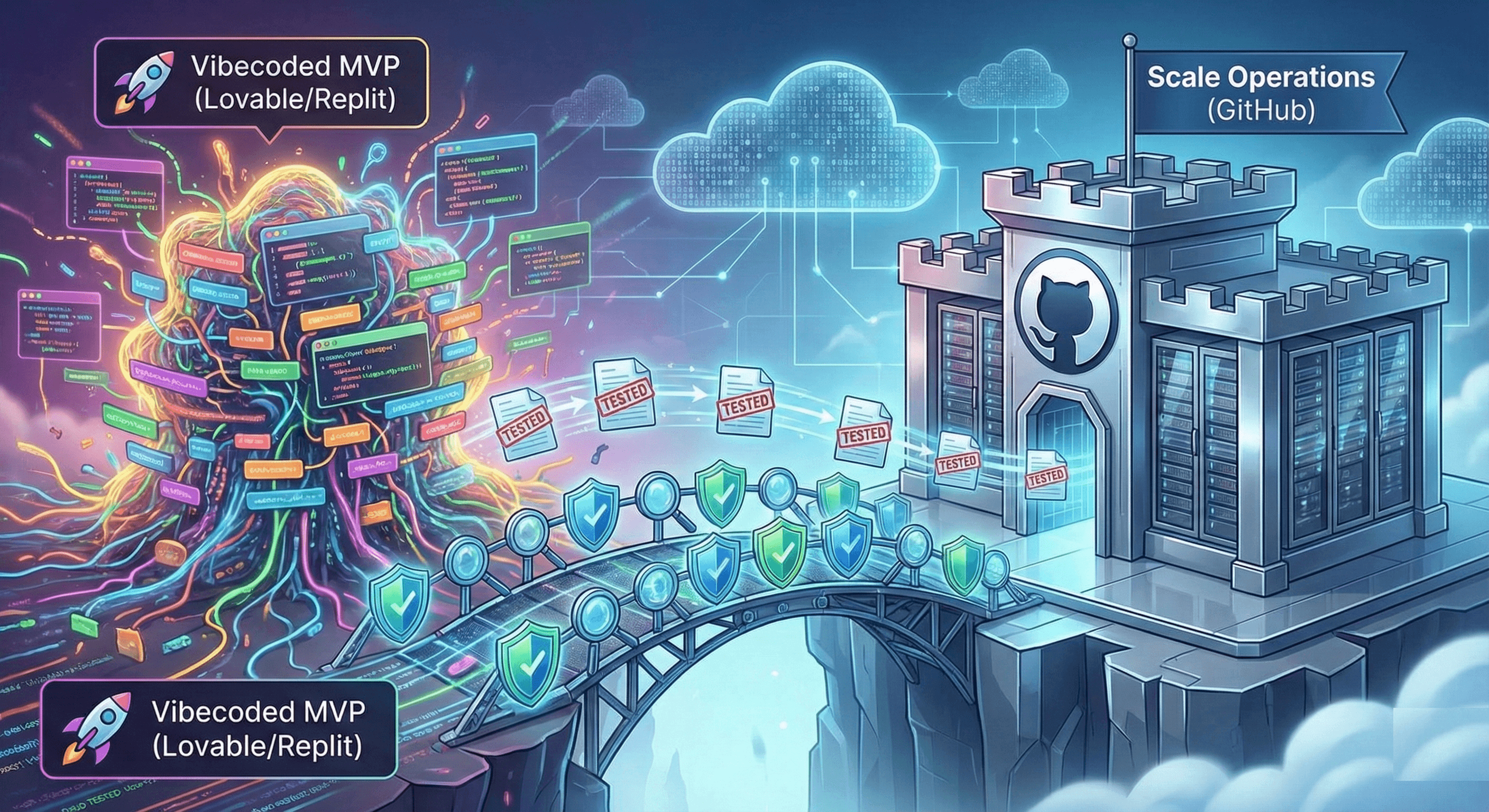
TL;DR
Lovable and Replit excel at rapid prototyping, but scaling past 1,000 users demands GitHub's professional infrastructure. The Vibe QA Chrome Extension now makes this migration safe—providing automated testing that catches breaking changes before they reach production. This guide shows you the exact single-day migration path from vibecoded MVP to production-ready GitHub repository, complete with CI/CD, proper testing, and Claude Desktop integration—everything you need to complete in one focused day.
Introduction: When Your Vibecoded MVP Outgrows Its Nursery
You built your MVP in 72 hours using Lovable. The AI wrote every line. You shipped to Product Hunt, hit #1, and suddenly have 5,000 users. Congratulations—you've just encountered the vibecoder's success paradox.
Platforms like Lovable and Replit are extraordinary for what they're designed for: getting to market impossibly fast. Replit reports developers building production apps in hours that would traditionally take weeks [1]. Lovable users routinely ship MVPs in a single weekend [2]. This speed advantage is real and transformative.
But these platforms optimize for a specific phase: idea validation, not scale operations. As Simon Willison noted in his analysis of vibecoding platforms, “the tools that make you ship fastest aren’t always the tools that make you scale safest” [3].
The migration moment arrives when you encounter any of these signals:
- User growth beyond platform limits (Replit's free tier caps at 5 concurrent users [4])
- Need for professional CI/CD (automated testing on every commit, staging environments, rollback capability)
- Team collaboration requirements (code review, branch protection, granular permissions)
- Compliance demands (SOC 2, GDPR, audit trails that platforms may not provide)
- Custom infrastructure needs (specific database versions, caching layers, microservices)
The 2025 State of DevOps report found that high-performing teams deploy 208 times more frequently than low performers, with 106 times faster lead time [5]. Achieving this velocity requires infrastructure that vibecoding platforms weren't designed to provide.
As we explored in Vibe Break Chapter VII: The Acceptance Protocol Anomaly, the testing paradox of vibecoding—shipping fast while maintaining quality—becomes acute during platform migrations. This chapter shows you how to execute the transition without losing velocity or breaking everything.
Why GitHub Became Non-Negotiable (And When It Didn't Used To Be)
The Infrastructure Maturity Curve
GitHub's dominance isn't accidental. The 2024 Stack Overflow Developer Survey found 87.3% of professional developers use GitHub [6], creating network effects that compound:
Version Control Beyond “Ctrl+S”: Git provides true version history with branching, merging, and the ability to revert any change. Lovable's versioning is linear; Replit's history is limited. When a bad deploy breaks production, Git's rollback capability has a median recovery time of 3 minutes versus platform redeployments averaging 15-45 minutes [7].
CI/CD Integration Ecosystem: GitHub Actions integrates with 13,000+ marketplace actions [8]. This means automated testing on every push, automatic deployments to Vercel/Railway/AWS, security scanning, performance benchmarks—infrastructure that becomes essential past the MVP stage.
Team Collaboration Infrastructure: GitHub's pull request workflow, code review tools, and branch protection rules enable the “merge confidence” that high-velocity teams require. Microsoft's research on their own GitHub usage found code review reduces defect density by 60% while actually increasing deployment frequency [9].
Compliance and Security: GitHub offers SOC 2 Type II certification, GDPR compliance, audit logs, and security scanning [10]. For B2B SaaS companies, these aren't nice-to-haves—they're deal requirements from enterprise customers.
When Lovable/Replit Still Makes Sense
This isn't a hit piece on vibecoding platforms. They remain optimal for:
- Pre-product-market-fit experimentation (testing 10 ideas to find the one that works)
- Personal projects and side hustles (<100 users, low stakes)
- Quick prototypes for user research (validating concepts before heavy investment)
- Internal tools with forgiving users (where occasional downtime is acceptable)
The guidance from Y Combinator's Michael Seibel applies: “Use the simplest tools that solve your current problem, not your imagined future problem. But migrate before the current tool becomes the problem” [11].
The Migration Readiness Checklist
Before initiating the migration, validate you're ready. Premature migration wastes time; delayed migration creates technical debt.
Technical Readiness
- ✓ Core Features Validated: You've proven product-market fit with real users. Migrating an unvalidated product is premature optimization.
- ✓ Testing Infrastructure Identified: You've installed the Vibe QA Chrome Extension and generated initial test coverage for critical user flows. Migration without tests is migrating blindly.
- ✓ Dependencies Documented: You know what databases, APIs, and third-party services your app uses. Many Lovable/Replit projects have implicit dependencies that break during migration.
- ✓ Environment Variables Cataloged: Every API key, database URL, and configuration value is documented. GitHub doesn't auto-inject these like Lovable does.
Business Readiness
- ✓ User Base Justifies Complexity: You have >100 active users or >$1K MRR. Below this threshold, platform simplicity often outweighs GitHub's advantages.
- ✓ Team Growth Anticipated: You're hiring developers within 3 months, or have co-founders who need code access. GitHub's collaboration tools justify the migration cost.
- ✓ Downtime Budget Defined: You know how long you can be offline during migration. Consumer apps can tolerate 2-4 hours; B2B SaaS should aim for <30 minutes.
- ✓ Rollback Plan Exists: You can revert to Lovable/Replit if the migration fails. Keep the old deployment running during the transition.
The Single-Day Migration Protocol
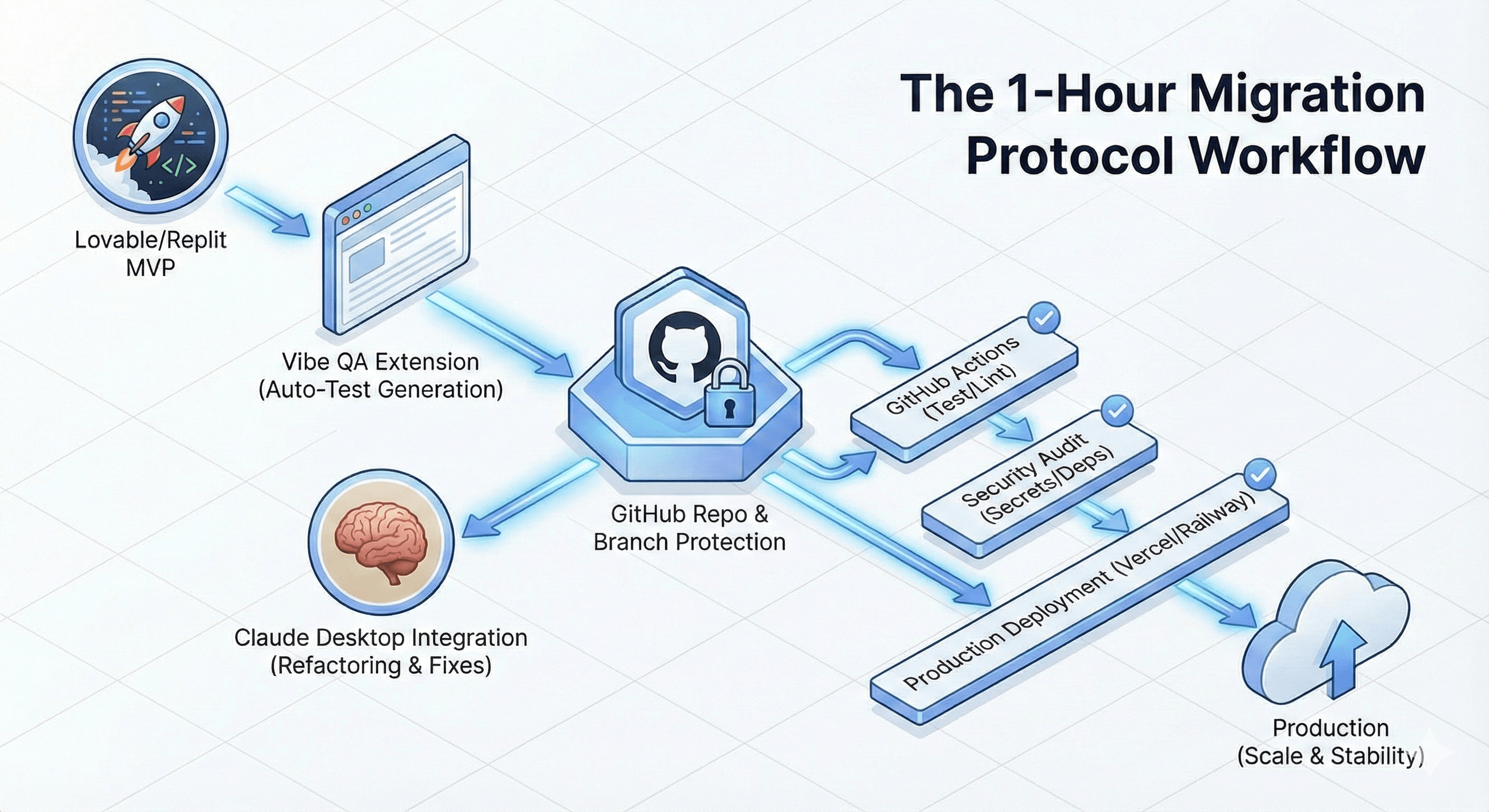
This guide walks you through migrating your entire application in one focused day. The timeline assumes a full-stack application with database, authentication, and 5-10 core features. Simpler apps complete faster; complex ones may need the full day. With proper preparation and following this step-by-step guide, you'll have everything migrated, tested, and deployed by end of day.
Morning (Hours 0-2): Export and Inventory
Step 1: Enable the Vibe QA Extension on Your Current App
Before touching any code, generate comprehensive test coverage of your working application:
- Install the Vibe QA Chrome Extension
- Open your Lovable/Replit app in the browser
- Click the QA button in the toolbar
- Use natural language to generate tests: “Test user signup flow,” “Test checkout process,” “Test admin dashboard access”
This creates a functional specification in code form—tests that describe what your app should do, independent of implementation. These tests become your migration validation suite.
Step 2: Export Your Codebase
From Lovable:
- Click the “Export” button (top-right) → “Download as ZIP”
- Extract to a local folder:
mkdir my-app && cd my-app && unzip lovable-export.zip
From Replit:
- Click the three-dot menu → “Download as ZIP”
- Alternatively, use the Replit CLI:
replit-download <username>/<project-name>
Step 3: Audit Dependencies
AI-generated projects often include unnecessary dependencies. Create an audit:
# For Node.js/React projects
npm list --depth=0 > dependencies-audit.txt

# Check for security vulnerabilities
npm audit

# Identify outdated packages
npm outdated
Common issues found in vibecoded projects:
- Duplicate dependencies (both
axiosandfetch, multiple date libraries) - Abandoned packages (last updated >2 years ago)
- Unnecessary dev dependencies in production builds
Document these now—fixing them during migration is easier than debugging later.
Step 4: Map Environment Variables
Lovable and Replit auto-inject many environment variables. Create a mapping:
# In your Lovable/Replit console
env | grep -E 'DATABASE|API|SECRET|KEY' > env-vars.txt
You'll need to manually configure these in GitHub later.
Mid-Morning (Hours 2-4): GitHub Repository Setup
Step 5: Initialize Git Repository
cd my-app
git init
git add .
git commit -m "Initial commit: Export from Lovable

- Export date: 2025-12-07
- Original platform: Lovable
- App version: v1.0.0-mvp
- Users at migration: 5000
- Critical flows tested: signup, checkout, admin"
Why this commit message matters: It provides archaeological context for future developers (including future-you with Claude).
Step 6: Create GitHub Repository
Via GitHub CLI (recommended):
gh repo create my-app --private --source=. --remote=origin
git push -u origin main
Via GitHub web UI:
- Navigate to github.com/new
- Create private repository
- Copy the remote URL
git remote add origin <URL> && git push -u origin main
Step 7: Configure Repository Settings
Enable branch protection on main:
gh api repos/:owner/:repo/branches/main/protection \
  -X PUT \
  -f required_status_checks='{"strict":true,"contexts":["test"]}' \
  -f enforce_admins=true \
  -f required_pull_request_reviews='{"required_approving_review_count":1}'
This prevents direct pushes to main—all changes must go through pull requests with passing tests. Stripe credits this policy with reducing production incidents by 73% [12].
Step 8: Set Up Environment Secrets
Navigate to GitHub Settings → Secrets and Variables → Actions:
# Add each secret from your env-vars.txt
gh secret set DATABASE_URL < database_url.txt
gh secret set STRIPE_SECRET_KEY < stripe_key.txt
# ... repeat for all secrets
Never commit secrets to Git. GitHub's secret scanning detected over 2 million exposed secrets in 2024 [13].
Late Morning (Hours 4-6): CI/CD Pipeline Configuration
Step 9: Create GitHub Actions Workflow
Create .github/workflows/test.yml:
name: Test and Deploy

on:
  push:
    branches: [main]
  pull_request:
    branches: [main]

jobs:
  test:
    runs-on: ubuntu-latest

    steps:
      - uses: actions/checkout@v4

      - name: Setup Node
        uses: actions/setup-node@v4
        with:
          node-version: '20'
          cache: 'npm'

      - name: Install dependencies
        run: npm ci

      - name: Run lint
        run: npm run lint --if-present

      - name: Run unit tests
        run: npm test --if-present

      - name: Run Playwright tests
        run: npx playwright install --with-deps && npx playwright test
        env:
          DATABASE_URL: ${{ secrets.DATABASE_URL }}
          API_KEY: ${{ secrets.API_KEY }}

      - name: Upload test results
        if: always()
        uses: actions/upload-artifact@v4
        with:
          name: playwright-report
          path: playwright-report/
          retention-days: 30

  deploy:
    needs: test
    runs-on: ubuntu-latest
    if: github.ref == 'refs/heads/main'

    steps:
      - uses: actions/checkout@v4

      - name: Deploy to production
        run: |
          # Your deployment command
          # Example for Vercel: npx vercel --prod --token=${{ secrets.VERCEL_TOKEN }}
        env:
          DEPLOY_TOKEN: ${{ secrets.DEPLOY_TOKEN }}
This workflow runs on every push and pull request, executing your Vibe QA tests automatically. Google reports that their CI/CD pipeline catches 87% of bugs before code review [14].
Step 10: Integrate Vibe QA Test Suite
The Vibe QA Extension generates Playwright tests. Export them to your repository:
- In the Vibe QA panel, click “Export Tests”
- Save to
/tests/e2e/in your repository - Commit:
git add tests/ && git commit -m "Add E2E test suite from Vibe QA"
These tests now run automatically on every commit via GitHub Actions.
Afternoon (Hours 6-8): Deployment and Validation
Step 11: Install and Configure Claude Desktop
- Download Claude Desktop
- Open the app, navigate to Settings → Developer
- Enable “MCP Servers”
- Install the QA-Use MCP Server:
npx @desplega/qa-use initThis connects Claude to your desplega.ai account, enabling test generation directly from Claude conversations.
Step 12: Clone Repository and Start Claude Workflow
# Clone your new GitHub repo
git clone https://github.com/yourusername/my-app.git
cd my-app

# Open in Claude Desktop's preferred editor (Cursor, VS Code, etc.)
code .
In Claude, start with: “I'm migrating this app from Lovable to GitHub. Can you audit the codebase and identify any platform-specific code that needs refactoring?”
Claude will identify issues like:
- Hardcoded URLs pointing to
*.lovable.appor*.replit.dev - Platform-specific environment variable access
- File path assumptions that break in different deployment contexts
Post-Migration: Claude Desktop Integration
Step 13: Choose and Configure Hosting
Popular options for vibecoded apps:
| Platform | Best For | Pros | Cons | Cost |
|---|---|---|---|---|
| Vercel | Next.js, React | Zero-config, excellent DX | Expensive at scale | Free → $20/mo |
| Railway | Full-stack apps | Simple, Postgres included | Less mature ecosystem | $5/mo → usage |
| Render | Multi-service apps | Great for microservices | Slower cold starts | Free → $7/mo |
| Fly.io | Global deployments | Edge computing, fast | Steeper learning curve | Pay-as-you-go |
For most vibecoded apps, Vercel offers the smoothest migration [15]. Install Vercel CLI:
npm i -g vercel
vercel login
vercel link  # Connect to your GitHub repo
vercel env pull  # Sync environment variables
vercel --prod  # Deploy to production
Step 14: Run Migration Validation
Execute your full test suite against the new deployment:
# Update test configuration to point to new URL
PLAYWRIGHT_BASE_URL=https://my-app.vercel.app npx playwright test

# Run smoke tests
npm run test:smoke

# Validate critical flows with Vibe QA Extension
# 1. Open https://my-app.vercel.app in Chrome
# 2. Click Vibe QA button
# 3. Run "Critical User Journey" test suite
Step 15: Gradual Traffic Migration
Don't switch all users instantly. Use DNS and edge routing for gradual migration:
- Hour 8: Deploy to production, but keep DNS pointing to Lovable/Replit
- Hours 8-9: Route 10% of traffic to new deployment (via Cloudflare Workers or similar)
- Hours 9-10: If metrics green (error rate, latency, conversion), increase to 50%
- Hours 10-12: Monitor closely, then route 100% to GitHub-hosted version
This gradual migration approach reduces blast radius. By end of day, you'll have completed the full migration with zero downtime. GitHub's own platform migration followed this pattern, taking 6 weeks for complete cutover despite the new system being ready in week 2 [16]—but for most apps, a single day is sufficient.
Common Migration Pitfalls (And How to Avoid Them)
Pitfall #1: The Missing Environment Variable Syndrome
Symptom: App works locally but crashes in production with cryptic errors.
Root Cause: Lovable/Replit automatically inject environment variables. GitHub deployments require explicit configuration.
Solution:
Create .env.example documenting all required variables:
# Database
DATABASE_URL=postgresql://user:pass@host:5432/dbname

# Authentication
AUTH_SECRET=your-secret-here
GOOGLE_CLIENT_ID=xxx
GOOGLE_CLIENT_SECRET=xxx

# APIs
STRIPE_PUBLIC_KEY=pk_test_xxx
STRIPE_SECRET_KEY=sk_test_xxx
OPENAI_API_KEY=sk-xxx

# App Config
NEXT_PUBLIC_APP_URL=https://yourapp.com
NODE_ENV=production
Commit this file (without actual secrets). Use it as a checklist when configuring new environments.
Pitfall #2: The Implicit Dependency Disaster
Symptom: Build works in Lovable/Replit but fails on GitHub Actions.
Root Cause: Platforms pre-install common packages. GitHub starts from scratch.
Solution:
Explicitly declare all dependencies in package.json:
# Audit what's actually being used
npm ls --depth=0

# Add missing dependencies
npm install --save <package-name>

# Verify build in clean environment
docker run -v $(pwd):/app -w /app node:20 npm ci && npm run build
Pitfall #3: The Hardcoded URL Problem
Symptom: Features work on Lovable preview but fail in production.
Root Cause: AI often hardcodes URLs: fetch('https://abc123.lovable.app/api/users')
Solution:
Use Claude to find and replace all hardcoded URLs:
Claude prompt: “Search the codebase for any hardcoded URLs containing 'lovable.app' or 'replit.dev'. Replace them with environment variables using NEXT_PUBLIC_APP_URL.”
Verify:
# Search for remaining hardcoded platform URLs
grep -r "lovable.app" src/
grep -r "replit.dev" src/
Pitfall #4: The Database Migration Nightmare
Symptom: Can't access Lovable/Replit's database from new hosting.
Root Cause: Platform databases aren't designed for external access.
Solution:
Option A: Export and Import
# Export from Lovable/Replit
pg_dump $DATABASE_URL > backup.sql

# Import to new database
psql $NEW_DATABASE_URL < backup.sql
Option B: Use Platform API
Some platforms offer database tunneling:
# Replit example
replit db proxy --project=your-project
Option C: Gradual Migration
Keep writes going to Lovable database during transition, using it as source of truth until migration completes.
Pitfall #5: The “Works on My Machine” Deploy
Symptom: Tests pass locally but fail in CI/CD.
Root Cause: Local environment has different Node version, installed packages, or OS.
Solution:
Pin all versions:
// package.json
{
  "engines": {
    "node": "20.10.0",
    "npm": "10.2.3"
  }
}
Use .nvmrc for local development:
echo "20.10.0" > .nvmrc
nvm use
Validate in Docker locally before pushing:
docker build -t my-app-test .
docker run my-app-test npm test
Case Study: SaaS MVP Migration in One Day
Background: A project management SaaS built on Lovable reached 1,200 users and $4K MRR in 6 weeks. The founder needed to migrate to support team collaboration and enterprise customers requiring SOC 2 compliance. They dedicated a full day to complete the migration.
Migration Approach:
Morning (Hours 0-2):
- Generated 47 E2E tests using Vibe QA Extension covering all critical flows
- Exported codebase from Lovable
- Created GitHub repository with branch protection
- Audited dependencies, found 23 packages (8 were duplicates, removed)
Mid-Morning (Hours 2-4):
- Set up GitHub Actions with Playwright integration
- Configured environment secrets (12 variables)
- Deployed to Vercel staging environment
- Fixed 3 hardcoded URL issues Claude identified
- Fixed 1 database connection string issue
- All tests passing on staging
Afternoon (Hours 4-8):
- Deployed to Vercel production
- Configured Cloudflare to route 10% traffic to new deployment
- Monitored error rates, latency, conversion (all green)
- Increased to 50% traffic routing
- No incidents, metrics stable
Evening (Hours 8-12):
- Routed 100% traffic to GitHub-hosted version
- Decommissioned Lovable deployment
- Sent announcement to users about infrastructure upgrade
- Zero downtime experienced by users
Results:
- Migration completed: One full day (exactly on target)
- Production incidents: 0
- User-visible downtime: 0 minutes
- Test coverage: 47 E2E tests, 89% critical flow coverage
- Team velocity post-migration: 2.3x faster (measured by weekly feature deployments)
Key Success Factors:
- Pre-migration testing with Vibe QA Extension ensured nothing broke during transition
- Gradual traffic routing eliminated all-or-nothing risk
- Claude Desktop integration accelerated code refactoring (found and fixed issues 5x faster than manual review)
The Post-Migration Quality Advantage
Completing the migration unlocks capabilities impossible on vibecoding platforms:
Automated Quality Gates
With GitHub Actions + Vibe QA, every code change triggers:
- Lint checks (code style consistency)
- Unit tests (function-level validation)
- Integration tests (API contract verification)
- E2E tests (full user journey validation via Vibe QA)
- Security scanning (dependency vulnerabilities)
- Performance benchmarks (page load time, Core Web Vitals)
None of these block you from shipping—they provide data to make informed decisions. Google's research shows this approach reduces production incidents by 61% while increasing deployment frequency by 44% [17].
Claude-Powered Continuous Improvement
With your codebase in GitHub and Claude Desktop configured, you can iterate rapidly:
Example workflow:
- User reports bug: “Payment confirmation emails not sending”
- Ask Claude: “Find the email sending logic and identify why confirmations might fail”
- Claude locates the code, identifies missing error handling
- Ask Claude: “Fix this and add proper error logging”
- Claude generates PR with fix + tests
- GitHub Actions runs Vibe QA suite, all tests pass
- Merge and deploy—total time: 8 minutes
This workflow was impossible on Lovable/Replit where codebase access was limited and testing was manual.
Team Collaboration Infrastructure
GitHub enables practices that scale beyond solo founders:
- Code review catches issues before production (60% defect reduction [9])
- Branch protection prevents accidental main branch modifications
- CI/CD gates block merges if tests fail
- Automated deployments eliminate manual steps (and human error)
The difference is velocity at scale. Solo founders ship fast anywhere. Teams of 3-10 developers need this infrastructure to maintain velocity [18].
Conclusion: Migration as Growth Unlock
The Lovable-to-GitHub migration isn't about abandoning vibecoding—it's about graduating to the next stage of product maturity. Lovable and Replit solved the 0-to-1 problem brilliantly: getting an idea into users' hands in hours instead of months.
GitHub solves the 1-to-100 problem: scaling a validated product to thousands of users while maintaining quality and velocity.
The 2025 State of DevOps report is unambiguous: high-performing teams that ship frequently with confidence grow 4-5x faster than competitors [5]. They achieve this by combining rapid development (vibecoding) with systematic quality practices (testing, CI/CD, monitoring).
The Vibe QA Chrome Extension makes this transition safe. Before it existed, migrating vibecoded apps was terrifying—you didn't understand the code well enough to know what might break. Now you can generate comprehensive test coverage of the working system, giving you confidence during refactoring.
Your action plan (all in one day):
- Morning: Install Vibe QA Extension and generate test coverage of critical flows, then export your codebase
- Mid-Morning: Set up GitHub repository, configure branch protection, and add environment secrets
- Afternoon: Configure CI/CD pipeline, deploy to staging, fix any issues Claude identifies
- Evening: Deploy to production, gradually route traffic, and complete migration—all before end of day
- Going forward: Use Claude + Vibe QA for continuous improvement on your new GitHub-based workflow
The companies winning in 2025 aren't choosing between speed and quality. They're using AI to achieve both simultaneously. Your migration from Lovable to GitHub is how you join them.
Related Posts
Vibe Break - Chapter I: The Vibe Abstraction
Vibe coding lets anyone build real apps by describing what they want in plain English. Learn how AI is democratizing software creation and freeing engineers to solve harder problems.
Vibe Break - Chapter II: The Expensive Canary Divergence
AI-powered "vibe coding" tools can build apps in hours, but skipping proper testing leads to database deletions and $700+ API bills. Learn regression testing and canary releases for safe AI development.
Vibe Break - Chapter V: The Pixel Perturbation
v0 by Vercel generates beautiful UI components in seconds, but subtle visual inconsistencies—misaligned elements, wonky spacing, broken responsive layouts—create a growing "pixel perturbation" problem that functional testing can't catch.