
Local-First Architecture: Build Apps That Work Offline-First
Why your next vibe project should think local-first—and how modern tools make it stupidly easy
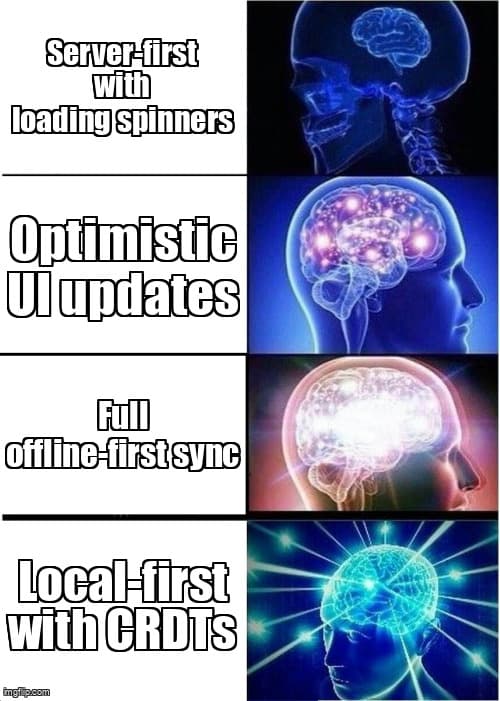
Let's talk about that feeling when you're on a plane, open your app, and... nothing loads. Or worse—you click a button, see a spinner, and watch your users bounce while your API thinks about life. Traditional client-server apps have trained us to accept loading states as inevitable. But what if I told you there's an architecture pattern that makes your app feel instant, work offline, and sync automagically when you're back online?
Enter local-first architecture—the pattern powering Figma's instant collaboration, Linear's lightning-fast UI, and Notion's offline editing. And the best part? You don't need to be a database wizard to build this way anymore.
What Actually Is Local-First?
Local-first flips the traditional architecture on its head. Instead of your UI talking to a server for every action, you:
- Store data locally first (IndexedDB, SQLite, local storage)
- Update the UI instantly from local data (no spinners)
- Sync changes in the background when connectivity allows
- Handle conflicts gracefully when multiple devices edit the same data
Think of it like Git for your app state. Every user has a full copy of their data, commits changes locally, and merges with the server when they're ready. The result? Apps that feel native-fast, work on planes, and never show loading spinners for user actions.
Why Vibe Coders Should Care Right Now
Here's the thing: users have been trained by native apps (Notion, Figma, Apple Notes) to expect instant feedback. When your web app shows a spinner after every click, it feels slow—even if your API responds in 200ms. Local-first closes that perception gap.
As a solopreneur, you're competing with products that have teams of 50 engineers. Local-first architecture gives you a UX superpower that makes your app feel just as polished—without building a complex offline sync system from scratch.
Plus, modern tools have made this approach way more accessible. You're not writing CRDT merge logic or building custom sync protocols anymore. The hard parts are abstracted away.
The Modern Local-First Stack (No PhD Required)
Let's break down the three tools that make local-first vibe-friendly:
ElectricSQL: PostgreSQL + Real-Time Sync
Best for: Apps that already use Postgres or need SQL queries
ElectricSQL gives you a local SQLite database in the browser that automatically syncs with your Postgres backend. Write SQL queries locally, get instant results, and changes propagate bidirectionally.
// Initialize Electric client
import { makeElectricContext } from 'electric-sql/react'
import { Electric, schema } from './generated/client'

const { ElectricProvider, useElectric } = makeElectricContext<Electric>()

// In your component
function TaskList() {
  const { db } = useElectric()!
  const { results: tasks } = useLiveQuery(
    db.tasks.liveMany({ where: { completed: false } })
  )

  // Update runs locally first, syncs in background
  const toggleTask = async (id: string) => {
    await db.tasks.update({
      where: { id },
      data: { completed: true }
    })
    // UI updates instantly, no await needed for sync
  }

  return <TaskItems tasks={tasks} onToggle={toggleTask} />
}
Vibe factor: If you're comfortable with Prisma or Drizzle, ElectricSQL feels natural. The live queries automatically re-render your components when data changes—whether from local edits or remote sync.
Replicache: Framework-Agnostic Sync
Best for: Existing apps where you want to add local-first incrementally
Replicache is a sync engine that works with any backend. You define mutations (user actions) and Replicache handles optimistic updates, conflict resolution, and eventual consistency. Works with React, Vue, Svelte, vanilla JS—whatever.
import { Replicache } from 'replicache'
import { useSubscribe } from 'replicache-react'

const rep = new Replicache({
  name: 'my-app-user-id',
  licenseKey: process.env.NEXT_PUBLIC_REPLICACHE_KEY!,
  pushURL: '/api/replicache/push',
  pullURL: '/api/replicache/pull',
  mutators: {
    createTask: async (tx, task: Task) => {
      await tx.put(`task/${task.id}`, task)
    },
    toggleTask: async (tx, id: string) => {
      const task = await tx.get(`task/${id}`)
      await tx.put(`task/${id}`, { ...task, completed: !task.completed })
    }
  }
})

// In component
function TaskList() {
  const tasks = useSubscribe(rep, async (tx) => {
    return await tx.scan({ prefix: 'task/' }).values().toArray()
  }, [])

  const toggle = (id: string) => {
    // Instant UI update, syncs in background
    rep.mutate.toggleTask(id)
  }

  return <TaskItems tasks={tasks} onToggle={toggle} />
}
Vibe factor: Replicache's mutation-based model is conceptually clean. You define what actions users can take, and it handles the rest. The server-side integration is straightforward—just implement push/pull endpoints that read/write from your database.
PowerSync: Mobile-First, Works Everywhere
Best for: Apps targeting mobile or needing robust offline support
PowerSync was built for React Native but works in browsers too. It gives you a SQLite database that syncs with your backend (Supabase, Postgres, MongoDB) and has built-in support for React Query integration.
import { PowerSyncDatabase } from '@powersync/web'
import { usePowerSync, useQuery } from '@powersync/react'

const db = new PowerSyncDatabase({
  schema: AppSchema,
  database: { dbFilename: 'app.db' },
  flags: { enableMultiTabs: true }
})

// Connect to backend
await db.connect({
  powerSyncUrl: process.env.NEXT_PUBLIC_POWERSYNC_URL!,
  token: session.access_token
})

// In component
function TaskList() {
  const powerSync = usePowerSync()
  const { data: tasks } = useQuery(
    'SELECT * FROM tasks WHERE completed = FALSE'
  )

  const toggleTask = async (id: string) => {
    // Write to local SQLite, sync happens automatically
    await powerSync.execute(
      'UPDATE tasks SET completed = TRUE WHERE id = ?',
      [id]
    )
  }

  return <TaskItems tasks={tasks} onToggle={toggleTask} />
}
Vibe factor: PowerSync's SQL interface is familiar if you've done backend work. The multi-tab support is killer—changes in one tab instantly appear in others, like Google Docs.
Choosing Your Local-First Tool
Here's the decision tree:
- Already using Postgres? ElectricSQL (schema sync is magic)
- Want framework flexibility? Replicache (works with anything)
- Building mobile-first? PowerSync (battle-tested on React Native)
- Need collaboration features? Replicache or ElectricSQL (both handle conflict resolution)
- Simplest onboarding? PowerSync with Supabase (great docs, clear patterns)
All three tools handle the hard problems (conflict resolution, eventual consistency, reconnection logic) so you don't have to. Pick based on your existing stack and scale up from there.
Real-World Local-First Patterns
Pattern 1: Optimistic UI Updates
The core local-first pattern. When a user clicks "like" or "mark done," update the local database immediately and show the new state. The sync happens in the background—if it fails, the tool handles rollback.
// Traditional approach: wait for server
const likePost = async (postId: string) => {
  setLoading(true)
  await fetch(`/api/posts/${postId}/like`, { method: 'POST' })
  await mutate() // Refetch from server
  setLoading(false)
}

// Local-first approach: update immediately
const likePost = (postId: string) => {
  rep.mutate.likePost(postId) // Instant UI update, syncs async
}
Pattern 2: Collaborative Editing
Multiple users editing the same document. Local-first tools use CRDTs or operational transforms under the hood to merge concurrent edits without data loss.
// ElectricSQL example: live collaborative list
function SharedTodoList() {
  const { db } = useElectric()!
  const { results: todos } = useLiveQuery(
    db.todos.liveMany({ where: { list_id: listId } })
  )

  // Changes from other users appear automatically via live query
  // Your changes sync in background
  const addTodo = async (text: string) => {
    await db.todos.create({
      data: { id: generateId(), text, list_id: listId }
    })
  }

  return <TodoItems items={todos} onAdd={addTodo} />
}
Pattern 3: Offline Queue
User makes changes while offline. When they reconnect, all pending changes sync automatically. The tools handle retry logic, queuing, and conflict resolution.
// PowerSync example: offline-first form submission
const submitFeedback = async (data: FeedbackForm) => {
  await powerSync.execute(
    'INSERT INTO feedback (id, message, created_at) VALUES (?, ?, ?)',
    [generateId(), data.message, Date.now()]
  )

  // If offline, this sits in local queue
  // When online, PowerSync syncs to server automatically
  // No extra code needed for offline handling
}
The Tradeoffs (Because Nothing Is Free)
Local-first isn't magic. Here's what you're signing up for:
- Bundle size: ElectricSQL adds ~200KB, Replicache ~50KB, PowerSync ~300KB (includes SQLite WASM). Still way smaller than most UI libraries.
- Learning curve: You need to think about eventual consistency instead of "read from DB, return to user." Easier than it sounds, but different.
- Conflict resolution: Last-write-wins works for many use cases, but collaborative editing needs CRDTs. The tools provide this, but you need to understand when conflicts happen.
- Backend changes: You'll need push/pull endpoints or webhooks for sync. Not complex, but it's new infrastructure.
- Not ideal for: Apps with heavy server-side computation, real-time multiplayer games, or cases where authoritative server state is critical (banking, medical records).
For 80% of CRUD apps, todo lists, note-taking tools, dashboards, and content editors? Local-first is a massive UX win with manageable complexity.
Start Simple: Your First Local-First Feature
Don't rewrite your entire app. Add local-first to one feature and feel the difference:
- Pick a high-frequency interaction (toggle switches, list reordering, quick edits)
- Add one of the tools above (Replicache is easiest to retrofit)
- Store that feature's data locally
- Make mutations instant (no loading states)
- Implement push/pull endpoints for background sync
Ship it, get user feedback, and expand from there. Users will immediately notice the difference—apps that respond instantly feel premium.
The Vibe Check
Local-first architecture isn't just a technical pattern—it's a UX philosophy. It says "users shouldn't wait for servers" and "offline isn't an error state, it's normal."
As a solopreneur, you can't compete on features with well-funded startups. But you can compete on how your app feels. Local-first gives you instant interactions, offline resilience, and collaborative features without hiring a distributed systems team.
The tools exist. The patterns are proven. The next app you build? Make it local-first. Your users will feel the difference immediately—and they won't know why your app just feels faster than everything else they use.
References
- Local-First Software - Ink & Switch inkandswitch.com/local-first
- ElectricSQL Documentation electric-sql.com/docs
- Replicache Documentation doc.replicache.dev
- PowerSync Documentation docs.powersync.com
Ready to build apps that feel instant?
Desplega helps teams in Barcelona, Madrid, Valencia, Spain and across Europe implement local-first architectures. Contact us to build apps that work offline and sync seamlessly.
Contact UsRelated Posts
Hot Module Replacement: Why Your Dev Server Restarts Are Killing Your Flow State | desplega.ai
Stop losing 2-3 hours daily to dev server restarts. Master HMR configuration in Vite and Next.js to maintain flow state, preserve component state, and boost coding velocity by 80%.
The Flaky Test Tax: Why Your Engineering Team is Secretly Burning Cash | desplega.ai
Discover how flaky tests create a hidden operational tax that costs CTOs millions in wasted compute, developer time, and delayed releases. Calculate your flakiness cost today.
The QA Death Spiral: When Your Test Suite Becomes Your Product | desplega.ai
An executive guide to recognizing when quality initiatives consume engineering capacity. Learn to identify test suite bloat, balance coverage vs velocity, and implement pragmatic quality gates.