
Context Window Mastery: Making AI Coding Assistants Remember Your Entire Codebase
Stop re-explaining your architecture every conversation. Learn how to structure projects so AI assistants actually remember what you built.
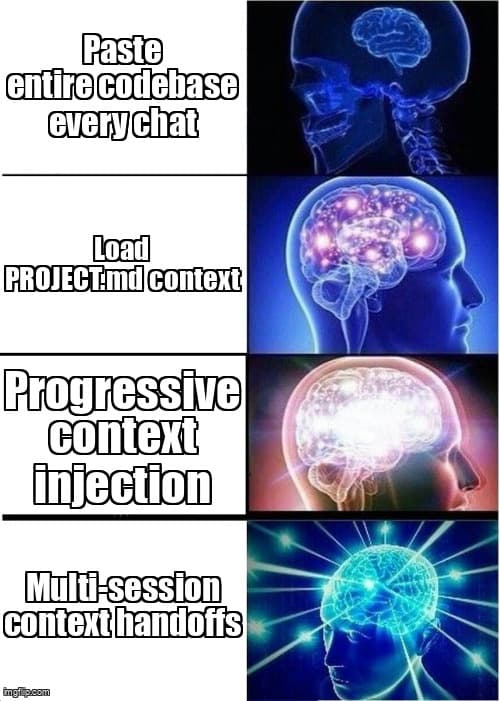
You're deep in a Claude conversation, 50 messages in, building a complex feature. The AI has been crushing it—understanding your Next.js architecture, respecting your Tailwind conventions, even remembering that weird edge case you mentioned an hour ago. Then you start a new chat to tackle authentication, and suddenly... it's like talking to a goldfish. "What's your tech stack?" "Where should I put this file?" "Are you using TypeScript?"
Sound familiar? Every vibe coder hits this wall. Modern AI assistants have massive context windows—Claude Opus can handle 200K tokens, GPT-4 Turbo reaches 128K—but most of us waste this power by treating every conversation like a blank slate. The result? You spend more time re-explaining your codebase than actually coding.
Here's the thing: the best AI-assisted developers aren't just good at prompting. They're architects of AI memory. They structure their projects, conversations, and prompts so their AI assistants maintain continuity across sessions, remember architectural decisions, and stay aligned with their vision even in 10K+ line codebases.
Understanding Context Windows: Your AI's Working Memory
Think of a context window like RAM for your AI assistant. When you paste your entire package.json, share three component files, and write a detailed prompt, you're loading data into that memory. The bigger the window, the more your AI can "remember" in a single conversation.
Real Context Window Sizes (Early 2026)
- Claude Opus 4.5: 200,000 tokens (~150K words, ~600 pages of code)
- GPT-4 Turbo: 128,000 tokens (~96K words, ~384 pages of code)
- Gemini 1.5 Pro: 1,000,000 tokens (~750K words, entire medium codebases)
- Claude Sonnet 4.5: 200,000 tokens (faster, slightly less capable)
For reference, the entire Harry Potter series is about 1 million words. A typical Next.js app with 50 components is around 15K-30K tokens.
But here's the catch: context windows reset with every new conversation. That's why you lose continuity between chats. And even within a single conversation, poorly structured context means the AI spends tokens on irrelevant info instead of what actually matters.
Strategy 1: Structure Your Project for AI Comprehension
Before you even open Claude or Cursor, you need to organize your codebase so AI can quickly grasp your architecture. This isn't about following rigid conventions—it's about creating landmarks that help AI orient itself.
The Power of Project Documentation Files
Create a PROJECT.md file in your root directory. This is your AI's north star—a single source of truth it can reference to understand your entire setup. Here's what works:
# MyApp - Project Context for AI Assistants

## Tech Stack
- **Framework:** Next.js 14 (App Router)
- **Styling:** Tailwind CSS + shadcn/ui components
- **Database:** Supabase (PostgreSQL)
- **Auth:** Supabase Auth (magic links only)
- **Deployment:** Vercel

## Architecture Decisions
1. All API routes use Server Actions (no /api folder)
2. Components are client-side by default unless data-fetching
3. We use optimistic updates for all mutations
4. Supabase RLS handles all authorization logic

## File Structure
- `app/` - Next.js App Router pages and layouts
- `components/ui/` - shadcn components (DO NOT MODIFY)
- `components/` - Custom components
- `lib/` - Utilities, DB client, types
- `supabase/` - Migrations and seeds

## Conventions
- Use kebab-case for file names
- Tailwind utilities only (no custom CSS)
- TypeScript strict mode enabled
- Zod for all form validation

## Current Features (Jan 2026)
✅ User authentication (magic link)
✅ Dashboard with real-time updates
✅ Profile management
🚧 Team invites (in progress)
📋 Analytics dashboard (next up)
When you start a new conversation, paste this file first. Boom—your AI assistant now knows your stack, your conventions, and your current state. No more "Should I use the Pages Router or App Router?" questions.
Tool-Specific Memory Files
Different AI coding tools have built-in ways to persist context:
- Cursor: Create
.cursorrulesin your project root. Cursor auto-loads this into every conversation. - Claude Code: Use
CLAUDE.mdfor project-specific instructions (automatically included in context). - GitHub Copilot Chat: Relies on
README.mdand file structure (no custom config yet). - v0 / Lovable: No persistent memory files yet—use explicit prompts each session.
Example .cursorrules File
# Cursor Rules for MyApp

You are working on a Next.js 14 app with Supabase.

## Key Rules
1. Always use Server Actions instead of API routes
2. Use Zod for validation before DB operations
3. Prefer optimistic updates with useOptimistic hook
4. Never expose Supabase service key in client code
5. Follow shadcn/ui patterns for new components

## Common Patterns
When creating a new feature:
1. Define Zod schema in lib/validations
2. Create Server Action in app/actions
3. Build form component with useFormState
4. Add optimistic update logic
5. Update types in lib/types.ts

## Forbidden Patterns
❌ NO custom CSS files (Tailwind only)
❌ NO external state management (use React 19 features)
❌ NO bypassing RLS policies (always use auth.uid())
❌ NO default exports (named exports only)
Strategy 2: Prompt Chaining That Maintains Context
Even with perfect project structure, long conversations eventually hit token limits or lose focus. The solution? Break your workflow into linked conversations where each one inherits context from the last.
The Context Handoff Pattern
When you finish a conversation, create a "context artifact" to carry forward. Here's how:
// Conversation 1: Building auth system
[... 40 messages of implementation ...]

Final prompt: "Summarize what we built for the next AI assistant:
- Which files we created/modified
- Key architectural decisions
- What's left to implement
- Any gotchas or edge cases"

AI Response:
## Auth System Implementation Summary

**Created Files:**
- app/actions/auth.ts (magic link server action)
- components/auth/login-form.tsx (client form)
- lib/validations/auth.ts (Zod schemas)

**Key Decisions:**
- Using Supabase magic links (no password flow)
- Email validation via Zod (no custom regex)
- Redirect to /dashboard after successful auth
- Error states use toast notifications

**Remaining Work:**
- Email rate limiting (prevent spam)
- Email template customization in Supabase
- Remember me functionality

**Gotchas:**
- Magic links expire after 1 hour
- Must enable email auth in Supabase dashboard
- Development mode shows link in terminal (no email sent)
Now when you start Conversation 2 (maybe adding password reset), you paste this summary plus your PROJECT.md. The new AI instance immediately knows what exists, what was decided, and why.
Progressive Context Loading
Don't dump your entire codebase into every conversation. Instead, load context progressively based on the task:
- Always include: PROJECT.md, .cursorrules (if using Cursor)
- For new features: Related component files, DB schema, relevant Server Actions
- For debugging: Error logs, the broken file, any files it imports
- For refactoring: Files to change + example of desired pattern from elsewhere
- For styling: Component file + similar styled component for reference
This keeps your token budget lean and focused. A 200K context window is powerful, but "I can load everything" doesn't mean "I should load everything."
Strategy 3: Context Injection Techniques
Sometimes you need dynamic context—recent git commits, current DB schema, or live API response shapes. This is where context injection shines.
Scripted Context Gathering
Create small scripts that gather context and format it for AI consumption. Example for Next.js projects:
#!/bin/bash
# context-dump.sh - Gather context for AI assistants

echo "## Recent Changes"
git log --oneline -10

echo "## Current Branch Status"
git status --short

echo "## Environment Variables (Public)"
cat .env.example

echo "## Database Schema"
cat supabase/migrations/*.sql | tail -100

echo "## Component Structure"
tree components/ -L 2 -I node_modules

# Usage: ./context-dump.sh | pbcopy (macOS)
# Then paste into AI conversation
Run this before starting a conversation about DB changes or component refactors. Your AI instantly knows what's been modified, what the current schema looks like, and how files are organized.
Live API Shape Injection
When integrating third-party APIs, don't make the AI guess response shapes. Fetch real data and inject it:
// Prompt template for API integration
I'm integrating the Stripe API for subscription management.

Here's a real Stripe subscription object from their API:
```json
{
  "id": "sub_1OX...",
  "object": "subscription",
  "status": "active",
  "current_period_end": 1704067200,
  "items": {
    "data": [
      {
        "id": "si_...",
        "price": {
          "id": "price_...",
          "unit_amount": 2000,
          "currency": "usd"
        }
      }
    ]
  }
}
```

Create TypeScript types for this response and build a Server Action
that fetches subscription status.
This eliminates the "AI invents fields that don't exist" problem. You're giving it ground truth data to work from.
When to Split Context vs. Load Everything
This is the million-dollar question. Here's the decision framework I use:
Load Everything When:
- Your entire codebase is under 30K tokens (~20-30 files)
- You're doing architectural refactoring that touches many files
- You need the AI to find inconsistencies across the codebase
- You're debugging a complex issue with unknown root cause
Split Context When:
- You have a 100+ file codebase (load relevant subset)
- You're working on isolated features (auth vs. billing vs. analytics)
- You're doing repetitive tasks (converting multiple components)
- The conversation is losing focus (start fresh with summary)
Here's a real example: I was building a SaaS with separate marketing site and app dashboard. Loading both into one conversation was 80K tokens and made the AI confused about which layout to use. Splitting into "marketing-context" and "app-context" conversations, each with their own PROJECT.md subset, cut tokens by 60% and eliminated confusion.
Real-World Example: Managing a 15K Line Next.js Project
Let me walk through how I structure context for a real production app—a Next.js SaaS with auth, billing, analytics, and admin dashboard. Total: ~15,000 lines of code across 120 files.
Project Structure
my-saas/
├── PROJECT.md (master context - always load)
├── .cursorrules (Cursor auto-loads this)
├── docs/
│   ├── AUTH.md (auth subsystem context)
│   ├── BILLING.md (Stripe integration context)
│   ├── ANALYTICS.md (analytics context)
│   └── ADMIN.md (admin dashboard context)
├── app/
├── components/
└── lib/
Conversation Workflow
Conversation 1: Adding a new billing feature
Load into context:
1. PROJECT.md (full context)
2. docs/BILLING.md (subsystem context)
3. lib/stripe.ts (Stripe client)
4. app/actions/billing.ts (existing billing actions)
5. Stripe subscription object (live API response)

Prompt: "Add a usage-based billing feature that charges $0.10
per API call over 1000/month. Users should see current usage
in the billing page."
Total tokens: ~8K. Focused, relevant, AI knows exactly what exists and can build on top of it.
Conversation 2: Debugging an auth issue
Load into context:
1. PROJECT.md
2. docs/AUTH.md
3. Error logs (pasted from terminal)
4. app/actions/auth.ts
5. components/auth/login-form.tsx
6. middleware.ts (route protection)

Prompt: "Users report magic links aren't working in production
but work locally. Here's the error: [paste error]"
Total tokens: ~6K. Again, laser-focused on the problem domain.
The BILLING.md Subsystem Context File
# Billing System Context

## Architecture
- Stripe for payment processing
- Webhook handler at app/api/webhooks/stripe/route.ts
- Server Actions in app/actions/billing.ts
- Supabase table: subscriptions (synced via webhook)

## Current Features
✅ Subscription creation (3 tiers: Free, Pro, Enterprise)
✅ Webhook processing (invoice.paid, customer.subscription.updated)
✅ Billing portal redirect
✅ Usage tracking (stored in usage_logs table)
🚧 Usage-based billing (implementing now)

## Key Files
- lib/stripe.ts - Stripe client and type definitions
- app/actions/billing.ts - All billing mutations
- components/billing/pricing-table.tsx - Public pricing page
- components/billing/billing-page.tsx - User billing dashboard

## Gotchas
- Webhook signature verification required (use STRIPE_WEBHOOK_SECRET)
- Test webhooks with 'stripe listen --forward-to localhost:3000/api/webhooks/stripe'
- Always update both Stripe subscription AND Supabase table (keep in sync)
- Stripe amounts are in cents (multiply by 100)
This subsystem context means I never re-explain Stripe setup. The AI knows the architecture, the gotchas, and where everything lives.
Advanced: Multi-Model Context Strategies
Sometimes you need different AI models for different tasks. Here's how to maintain context across models:
- Claude for architecture: Use Opus for high-level design decisions, complex refactors. Its 200K window handles entire subsystems.
- GPT-4 for rapid iteration: Use GPT-4 Turbo for quick component builds, style tweaks. Faster responses, still 128K window.
- Gemini for massive context: Use Gemini 1.5 Pro when you genuinely need to load 100+ files (rare, but powerful for cross-codebase analysis).
- v0/Lovable for UI: Use vibe tools for rapid UI prototyping, then export code and continue in Cursor with full context.
The key: always pass forward your PROJECT.md and relevant subsystem docs. The model changes, but your context structure stays consistent.
Common Mistakes (And How to Fix Them)
❌ Mistake 1: Loading package.json and node_modules paths
Why it's bad: Wastes thousands of tokens on dependency lists the AI already knows.
Fix: Only load package.json if asking about dependencies. Otherwise, just state "Next.js 14 with Tailwind" in PROJECT.md.
❌ Mistake 2: Vague architecture descriptions
Bad: "We use Supabase for backend stuff"
Good: "Supabase handles auth (magic links), PostgreSQL database (with RLS), and real-time subscriptions. All data access via Server Actions, never directly from client."
❌ Mistake 3: Not updating context files as project evolves
Why it's bad: AI follows outdated patterns from stale PROJECT.md.
Fix: When you make architectural changes (switch from Pages Router to App Router, add new auth provider), immediately update PROJECT.md and subsystem docs. Treat them as living documentation.
❌ Mistake 4: Asking AI to "check all files for X"
Why it's bad: AI can't grep your codebase. It only sees what you load into context.
Fix: Use actual grep or IDE search first, then paste results. Or use Claude Code / Cursor's codebase indexing features.
Tool-Specific Context Optimization
Cursor: Use @-mentions Strategically
Cursor's @-mention feature lets you reference files, folders, or docs without pasting. Use it to keep prompts clean:
Instead of:
"Here's my auth.ts file: [paste 200 lines]
Here's my types.ts file: [paste 150 lines]
Now add password reset."

Do this:
"Add password reset to @app/actions/auth.ts
following the pattern in @lib/types.ts for validation."
Cursor intelligently loads only the mentioned files. Cleaner prompts, same context power.
Claude Code: Leverage CLAUDE.md + Slash Commands
Claude Code automatically loads CLAUDE.md into every conversation. Use it for project-specific commands and patterns:
# CLAUDE.md

## Custom Commands

**"/new-feature [name]"** - Scaffold a new feature with:
- Zod schema in lib/validations/[name].ts
- Server Action in app/actions/[name].ts
- Component in components/[name]/
- Types in lib/types.ts

**"/db-change"** - Remind me to:
1. Create migration in supabase/migrations/
2. Update types with 'supabase gen types typescript'
3. Update RLS policies if needed
4. Test with seed data

## Project-Specific Patterns
When creating forms:
- Always use shadcn Form component
- Validate with Zod before Server Action
- Show toast on error/success
- Use useFormState for loading states
Now you can just type "/new-feature billing-export" and Claude follows your exact scaffolding process.
v0 / Lovable: Export Context for Continuation
Vibe tools like v0 and Lovable don't have persistent context, but you can export designs and continue in Cursor/Claude:
Workflow:
1. Build UI prototype in v0 (fast iteration)
2. Export code when happy with design
3. Start Cursor conversation with:
   - Your PROJECT.md
   - Exported v0 component
   - Prompt: "Integrate this v0 component into my Next.js app.
     Make it work with our Supabase auth and Server Actions."

Cursor now has both the working UI code and your project context.
Best of both worlds.
Key Takeaways
- Structure beats size - A well-organized 10K token context beats a disorganized 100K context. Focus on relevant, hierarchical information.
- Project memory files are non-negotiable - Create PROJECT.md, .cursorrules, or CLAUDE.md depending on your tool. Update them as your architecture evolves.
- Split by subsystem, not by arbitrary size - Organize conversations around features (auth, billing, analytics) rather than trying to load everything or nothing.
- Context handoffs preserve continuity - When starting a new conversation, summarize what was built and paste it forward. This creates a "memory chain" across sessions.
- Inject live data for integrations - Don't make AI guess API shapes. Fetch real responses and paste them into prompts for accurate type generation.
- Use tool-specific features - @-mentions in Cursor, slash commands in Claude Code, subsystem docs for everything. Work with your tools, not against them.
- Progressive disclosure wins - Start with PROJECT.md, add subsystem docs if needed, load specific files only when relevant. Token budget is finite—spend it wisely.
The Bottom Line
Context window mastery isn't about memorizing token limits or obsessing over model specs. It's about designing your project and prompts so your AI assistant has exactly the information it needs, when it needs it, without drowning in noise.
The best vibe coders I know spend 10 minutes setting up PROJECT.md and subsystem docs, then save hours of re-explanation over the next month. They treat their AI's memory as a first-class concern, not an afterthought.
Start small: create a PROJECT.md today. Document your stack, your conventions, your current state. Next time you start a coding session, paste it in. You'll immediately notice fewer "what framework are you using?" questions and more "here's how to implement that feature" responses.
That's context window mastery. Not a trick or a hack—just intentional information architecture for the age of AI-assisted development.
Ready to level up your development workflow?
Desplega.ai helps solo developers and small teams ship faster with professional-grade tooling. From vibe coding to production deployments, we bridge the gap between rapid prototyping and scalable software.
Get Expert GuidanceRelated Posts
Cody's Repository Indexing: Does Cognitive Offloading Create Knowledge Gaps in Large Codebases? | Desplega AI
A practical deep dive into Cody repository indexing, context retrieval, and how indie hackers avoid AI-created knowledge gaps.
Hot Module Replacement: Why Your Dev Server Restarts Are Killing Your Flow State | desplega.ai
Stop losing 2-3 hours daily to dev server restarts. Master HMR configuration in Vite and Next.js to maintain flow state, preserve component state, and boost coding velocity by 80%.
The Flaky Test Tax: Why Your Engineering Team is Secretly Burning Cash | desplega.ai
Discover how flaky tests create a hidden operational tax that costs CTOs millions in wasted compute, developer time, and delayed releases. Calculate your flakiness cost today.