
Stop Prompting Blindly: Build a Personal Context Library for Faster Vibe Coding
You're wasting 20 minutes every session re-explaining your stack. Here's how to fix it once and never again.
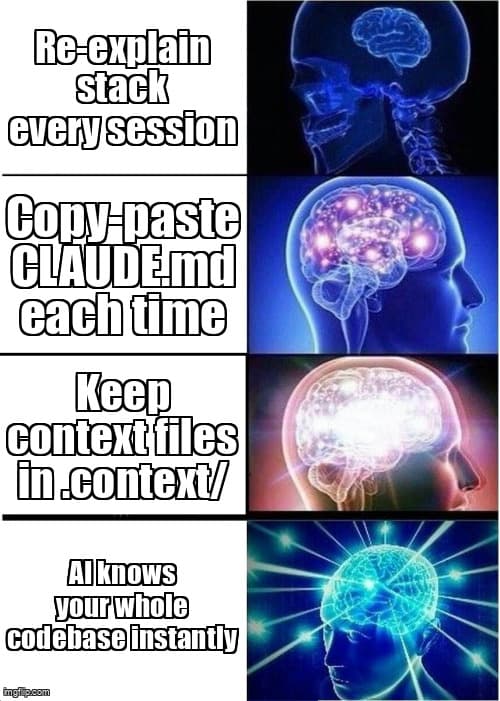
You open Claude Code. Or Cursor. Or Windsurf. You type: “So my app uses Next.js 15, Supabase for auth and database, Tailwind with shadcn/ui, TypeScript strict mode, and we follow a feature-based folder structure...”
Sound familiar? That's not prompting — that's tax. And you're paying it every single session.
According to the 2025 GitHub Copilot Impact Report, developers using AI coding tools spend an average of 18 minutes per session on context re-establishment before writing productive prompts. That's over 90 minutes a week you'll never get back.
The fix is a personal context library: a small set of markdown files that live in your repo, load automatically, and hand your AI everything it needs to know — before you type a single word.
What is a Personal Context Library?
A personal context library is 3-5 markdown files describing your stack, component patterns, data model, and brand voice — loaded into any AI session to eliminate repetitive setup and deliver consistent, on-brand outputs instantly.
Think of it as your project's memory. AI models have no persistent state between sessions. Every new conversation starts blank. Your context library is the antidote — a portable knowledge snapshot that transforms a generic AI into a specialist that knows your codebase cold.
The concept isn't new. Senior engineers have used README files and architecture decision records (ADRs) for years. What's changed is that modern AI tools — Claude Code, Cursor, Windsurf — actively read and apply these files at startup. That makes a structured context library a genuine force multiplier, not just good documentation hygiene.
Why Does AI Give Inconsistent Results Without Context?
Without a context anchor, your AI makes assumptions. It defaults to generic patterns, popular conventions, and the most common interpretation of your request — none of which may match your actual project.
Ask a context-free AI to “add a user profile page” and it might scaffold a Pages Router component when you're on App Router. It might reach for Prisma when you're using Drizzle. It might name the component UserProfile when your convention is ProfileView.
Each mismatch costs you time. You correct, re-prompt, or silently fix the output — which introduces drift between what the AI thinks your codebase looks like and what it actually is. Over weeks, this compounds into a frustrating pattern of half-useful suggestions.
The Context Gap Problem
A Stack Overflow Developer Survey (2025) found that 71% of developers using AI coding assistants reported “inconsistent code style” as their top frustration — ranking above hallucinations and outdated API suggestions. Inconsistency is almost always a context problem, not a model capability problem.
The 4 Core Files Every Context Library Needs
You don't need a perfect system on day one. Start with four files. Each takes 5-10 minutes to write and covers a distinct layer of context your AI needs to produce coherent, on-brand code.
File 1: project-spec.md — Your Stack and Architecture
This is the foundation. It answers the “what are we building and with what?” question once, permanently.
# Project Spec

## What We're Building
A SaaS task manager for freelancers. Users manage projects,
track time, and generate invoices. Single-tenant, auth-gated.

## Tech Stack
- Framework: Next.js 15 (App Router, React Server Components)
- Database: Supabase (PostgreSQL + Row Level Security)
- ORM: Drizzle ORM
- Auth: Supabase Auth (email/password + Google OAuth)
- Styling: Tailwind CSS v4 + shadcn/ui
- Language: TypeScript 5.x (strict mode)
- Deployment: Vercel

## Folder Structure
app/           → Next.js App Router pages and layouts
app/api/       → Route handlers
components/    → Shared UI components (shadcn + custom)
features/      → Feature modules (auth, projects, invoices)
lib/           → Utilities, db client, server actions
db/            → Drizzle schema and migrations

## Key Constraints
- All data mutations go through Server Actions (no client-side fetch)
- RLS enforced at DB level — never skip userId filter
- No client components unless interactivity is required
Keep this file to 50-80 lines. If it grows longer, you're documenting instead of anchoring — move the extra detail to architecture docs.
File 2: component-conventions.md — Naming, Patterns, and Anti-Patterns
This is where AI consistency problems live. Without explicit conventions, your AI will invent its own.
# Component Conventions

## Naming
- Pages: PascalCase, noun-first (ProjectsPage, InvoiceDetailPage)
- Components: PascalCase, descriptive (ProjectCard, TimeEntryRow)
- Server Actions: camelCase verb-noun (createProject, deleteInvoice)
- DB queries: camelCase verb-noun (getProjectById, listUserProjects)

## Component Structure
1. Imports (external → internal → types)
2. Types/interfaces
3. Server component or async function
4. Return JSX

## Patterns We Use
- shadcn/ui for ALL form elements (no raw HTML inputs)
- Zod schemas for all form validation
- useFormState + Server Actions for mutations (no react-query)
- Suspense + loading.tsx for async data (no client-side spinners)

## Patterns We DON'T Use
- useState for server data (use RSC + revalidatePath instead)
- useEffect for data fetching
- axios (use fetch with Next.js cache options)
- class components
File 3: data-model.md — Schema Snapshot
Your AI doesn't know your schema. Without it, generated queries invent columns that don't exist, use the wrong relation names, and miss critical constraints.
# Data Model (Drizzle Schema Snapshot)

## users (managed by Supabase Auth)
- id: uuid (PK)
- email: text
- created_at: timestamp

## projects
- id: uuid (PK)
- user_id: uuid (FK → users.id)
- name: text NOT NULL
- client_name: text
- status: enum('active', 'paused', 'completed')
- hourly_rate: numeric(10,2)
- created_at: timestamp

## time_entries
- id: uuid (PK)
- project_id: uuid (FK → projects.id)
- user_id: uuid (FK → users.id)
- started_at: timestamp NOT NULL
- ended_at: timestamp
- description: text
- is_billable: boolean DEFAULT true

## invoices
- id: uuid (PK)
- project_id: uuid (FK → projects.id)
- user_id: uuid (FK → users.id)
- status: enum('draft', 'sent', 'paid')
- total_amount: numeric(10,2)
- issued_at: timestamp

## Key Relations
- projects → time_entries: one-to-many
- projects → invoices: one-to-many
- All tables have RLS: user_id = auth.uid()
You don't need every column — aim for the shape and the constraints. Update this file after every migration, not during.
File 4: voice-guide.md — Tone and Copy Rules
This one is consistently skipped and consistently missed. When your AI writes error messages, empty states, onboarding copy, or button labels without a voice guide, it defaults to generic enterprise-speak.
# Voice & Tone Guide

## Brand Personality
Friendly, direct, no-fluff. Like a smart friend who gets
things done — not a corporate app, not a startup trying too hard.

## Writing Rules
- Use "you" not "the user" or "users"
- Active voice always (not "invoice was created" → "Invoice created")
- Sentence case for UI labels (not Title Case)
- Oxford comma in lists
- Contractions are fine (you're, it's, we'll)

## Avoid
- Exclamation marks (we don't celebrate basic actions)
- "Please" (we're friendly, not apologetic)
- Jargon: "leverage", "utilize", "synergy"
- Passive constructions in errors

## Error Messages
BAD:  "An error occurred while processing your request."
GOOD: "Couldn't save the project. Check your connection and try again."

## Empty States
BAD:  "No projects found."
GOOD: "No projects yet. Add your first one to get started."

## CTA Buttons
BAD:  "Submit" / "OK" / "Confirm"
GOOD: Action verbs: "Save project", "Send invoice", "Start timer"
How to Load Your Context Library Into Each Tool
The three major AI coding tools each have a native mechanism for loading project-level context. Once configured, they auto-load your files at every session start — zero manual effort per conversation.
| Tool | Config File | Location | Notes |
|---|---|---|---|
| Claude Code | CLAUDE.md | Project root | Loaded automatically; can reference other files with @path/to/file |
| Cursor | .cursorrules | Project root | Plain text; applies to all Composer and Chat sessions |
| Windsurf | .windsurfrules | Project root | Supports markdown; also check Global Rules in settings |
The cleanest approach: keep your four context files in a .context/ directory at the project root, then have each tool's config file import or reference them.
In Claude Code's CLAUDE.md, you can use file references to keep things DRY:
# CLAUDE.md

This project uses a context library. Read these files before
generating any code:

- Stack and architecture: @.context/project-spec.md
- Component conventions: @.context/component-conventions.md
- Data model: @.context/data-model.md
- Voice and copy rules: @.context/voice-guide.md

## Quick Rules
- Always use Server Actions for mutations
- Never skip user_id filters on DB queries
- Run `npm run type-check` before declaring anything done
For Cursor and Windsurf, paste a condensed version of your context directly into .cursorrules / .windsurfrules. These tools have context token limits, so prioritize conventions over exhaustive documentation.
How Should You Maintain Your Context Library Over Time?
A stale context library is worse than none. If your AI is confidently generating code against a data model that no longer exists, you'll spend more time fixing regressions than you save on setup.
The key is trigger-based updates — update on events, not on a schedule:
- New dependency added → update
project-spec.md - Schema migration run → update
data-model.md - New naming convention agreed → update
component-conventions.md - Brand voice shift (new landing page, rebrand) → update
voice-guide.md - AI generates something wrong twice in a row → add a rule to prevent it
Add a weekly 5-minute review to your Friday workflow. Open each file, skim it against what you actually built this week, and update anything that's drifted. The goal is that if someone new joined your project and read these four files, they'd have 80% of the context they need to start contributing.
Pro Tip: Treat Anti-Patterns as First-Class Citizens
The most valuable lines in your context library are the “we don't do this” lines. According to Anthropic's Claude system prompt guidance (2025), explicit negative constraints (“never use X”, “avoid Y pattern”) reduce unwanted outputs by up to 60% compared to positive-only instructions. Every time you catch your AI doing something you don't want, add a “don't do this” rule immediately.
Building Your Context Library in Under 30 Minutes
Here's the exact sequence to go from zero to a working context library today:
- Create the directory —
mkdir .contextat your project root. Add it to.gitignoreor commit it — your call. Committing means your whole team benefits. - Write project-spec.md first (10 min) — List your stack, folder structure, and 3-5 key architectural constraints. Don't over-explain. Bullet points only.
- Write component-conventions.md (8 min) — List naming rules, 3-5 patterns you use, and 3-5 patterns you explicitly avoid.
- Write data-model.md (7 min) — Copy-paste your schema types or migration file, then strip it down to table names, key columns, and relation types.
- Write voice-guide.md (5 min) — Three columns: tone words, writing rules, bad/good examples for errors and empty states.
- Wire up CLAUDE.md / .cursorrules / .windsurfrules (5 min) — Add references or paste condensed context. Test with a fresh session.
Key Takeaways
- Context loss is your #1 AI productivity drain — developers lose 18+ minutes per session re-establishing project context without a structured system.
- Four files cover everything — project spec, component conventions, data model, and voice guide give your AI 80% of what it needs for coherent, on-brand outputs.
- Each tool has native support — CLAUDE.md, .cursorrules, and .windsurfrules auto-load at session start. One-time setup, zero ongoing effort per session.
- Negative constraints outperform positive instructions — “never use X” rules cut unwanted outputs more effectively than describing what you want.
- Update on triggers, not schedules — link context file updates to code events (new dep, migration, convention change) to keep your library accurate without overhead.
- 30 minutes to build, 5 minutes per week to maintain — you recover the investment in the first session you stop re-explaining your stack.
Ready to level up your development workflow?
Desplega.ai helps solo developers and small teams ship faster with professional-grade tooling. From vibe coding to production deployments, we bridge the gap between rapid prototyping and scalable software.
Get Expert GuidanceFrequently Asked Questions
What is a personal context library for AI coding?
A personal context library is 3-5 markdown files describing your stack, component patterns, data model, and brand voice — loaded into any AI session to eliminate repetitive setup and ensure consistent outputs.
What files should a context library include?
Start with four files: project-spec.md (stack and architecture), component-conventions.md (naming and patterns), data-model.md (schema snapshot), and voice-guide.md (tone and copy rules).
How do I use a context library in Claude Code vs Cursor?
In Claude Code, put your context in CLAUDE.md at the project root. In Cursor, use .cursorrules. In Windsurf, use .windsurfrules. Each tool auto-loads the file at session start.
How often should I update my context library files?
Update on trigger events: new dependency added, schema migration, naming convention change, or brand voice shift. A weekly 5-minute review prevents drift and keeps outputs accurate.
How long does it take to build a context library from scratch?
Building all four core files takes 20-30 minutes the first time. Maintaining them is 5 minutes per week. Most developers recover that time in the first session.
Related Posts
Hot Module Replacement: Why Your Dev Server Restarts Are Killing Your Flow State | desplega.ai
Stop losing 2-3 hours daily to dev server restarts. Master HMR configuration in Vite and Next.js to maintain flow state, preserve component state, and boost coding velocity by 80%.
The Flaky Test Tax: Why Your Engineering Team is Secretly Burning Cash | desplega.ai
Discover how flaky tests create a hidden operational tax that costs CTOs millions in wasted compute, developer time, and delayed releases. Calculate your flakiness cost today.
The QA Death Spiral: When Your Test Suite Becomes Your Product | desplega.ai
An executive guide to recognizing when quality initiatives consume engineering capacity. Learn to identify test suite bloat, balance coverage vs velocity, and implement pragmatic quality gates.