
Discovery Runs
Automatically discover and generate comprehensive test cases using AI-powered agents. Desplega.ai's Discovery Runs intelligently explore your application, creating tests based on your intent, personas, and existing test context to build meaningful coverage.
How It Works
Discovery Runs use AI-powered agents to automatically explore your application and generate comprehensive test cases. The Agent Manager coordinates multiple Test Creator agents, analyzing your application context, personas, and existing tests to discover increasingly complex test scenarios. Each agent works independently to create unique tests, and you can monitor their progress in real-time, interrupt them when needed, or provide clarifying input.
1. Creating a Discovery Run
Navigate to the Discovery Runs page to see all your current and past discovery runs. From here, you can create a new discovery run by clicking the + button in the top right corner.

Discovery Runs Table
- Status Indicators: See which runs are waiting for input, currently running, or completed (Done)
- Run History: View all current and past discovery runs with their descriptions, test counts, and issues found
- Quick Access: Click the + button to create a new discovery run
Configuration Options
- Number of Flows: Mandatory input - specify how many tests to create (max: 50)
- Discovery Intent: Optional - describe what to test, focus areas, and areas to ignore
- Persona: Optional - select a persona to follow specific rules and context
Discovery Run Configuration
When creating a new discovery run, you'll see a modal with several configuration options:
Discovery Intent
Describe what you want to test, which areas of your app to focus on, and which areas to ignore. This helps guide the AI agents toward generating relevant test cases.
Persona
Select a persona so your discovery follows a specific set of rules and context. Personas help shape how agents interact with your application during test creation.
Number of Flows
Mandatory field - Specify the number of tests you want to create. We recommend 3-5 flows for optimal results, with a maximum of 50 tests per discovery run.
App Configuration & MAX Mode
Select the app configuration to test, and choose between fast mode (quick test generation) or MAX mode (comprehensive, thorough test exploration).
2. Monitoring Discovery Runs & Agent Manager
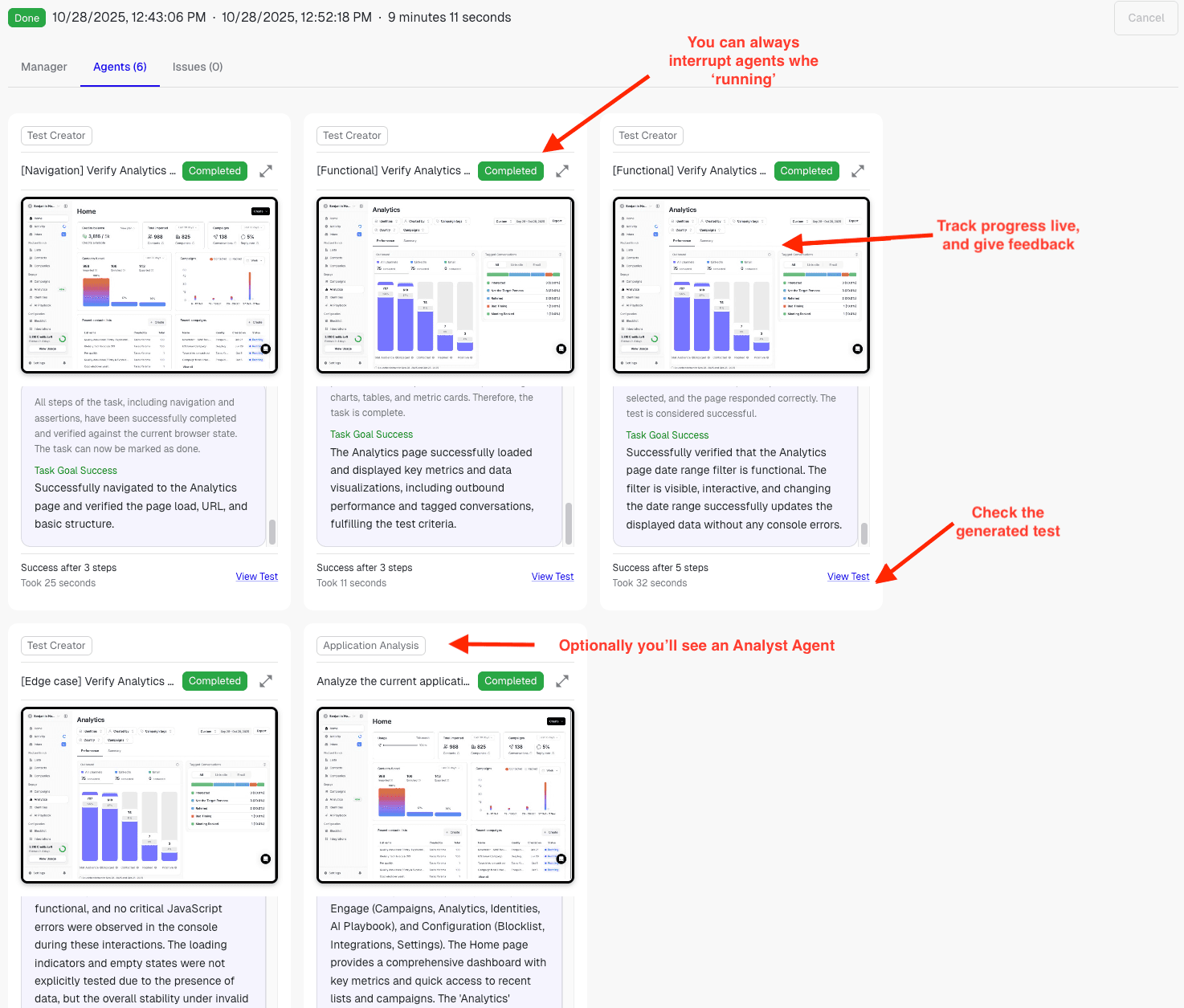
Once you trigger a discovery run, the Agent Manager coordinates the entire process. It analyzes all available context, personas, and existing tests in your platform. When needed, it deploys an Analyst Agent to discover new, increasingly complex test cases. The Agent Manager creates as many Test Creator agents as you requested, and each agent independently works to create a unique test.
Agent Manager
- Context Analysis: Analyzes all available context, personas, and existing tests
- Agent Coordination: Creates and manages multiple Test Creator agents simultaneously
- Analyst Agent: Optionally deploys Analyst Agent for complex test case discovery
Live Progress Monitoring
- Real-Time Updates: Watch agents create tests live with progress indicators
- Agent Cards: Each agent has its own card showing test name, status, and progress
- Success Metrics: See how many steps each test took and time required
Test Creation Strategy
The Agent Manager follows an intelligent strategy when creating tests:
- Initial Focus: Unless you provide clear instructions, the first iterations focus on smoke/basic testing to establish minimum meaningful coverage. This ensures you have foundational tests before moving to more complex scenarios.
- Progressive Complexity: As agents complete basic tests, the Analyst Agent identifies increasingly complex test cases, building on the initial coverage.
- Independent Agents: Each Test Creator agent works independently to create a unique test, preventing duplicate test cases and maximizing coverage diversity.
Interacting with Agents
You maintain full control over the discovery process:
Interrupt Agents
You can always interrupt a running agent and provide clarifying instructions. This is especially useful when an agent needs guidance or you want to redirect its focus.
Cancel Tests
If you determine a test won't be helpful, you can cancel it. Agents may also notify you when they have concerns or need input, allowing you to guide the discovery process.
What Happens During Discovery
- The Agent Manager analyzes your application context, existing test suites, and configured personas
- Multiple Test Creator agents are spawned to work in parallel, each creating unique test cases
- An Analyst Agent (optional) explores your application to discover increasingly complex scenarios
- Initially, agents focus on smoke/basic testing to establish minimum meaningful coverage, then progress to more complex tests
- You can monitor progress in real-time and interact with agents as needed
3. Reviewing and Organizing Generated Tests
Once a discovery run finishes, it's important to review the generated tests to curate your test collection:
Select Significant Tests
Review all generated tests and select the ones that are significant and valuable for your test coverage. These are the tests you want to keep and potentially add to your test suites.
Organize Your Collection
Delete or label tests that you don't need. This helps keep your test collection organized and focused on meaningful coverage. Organization is key to maintaining an effective testing strategy.
Running Your Selected Tests
For the tests you select for your next suite, simply run them and see the magic happen! Discovery Runs work seamlessly with test runs to help you build comprehensive test coverage efficiently.
Benefits
- Automated Test Discovery: Let AI agents automatically discover and create test cases based on your application structure and your specified intent.
- Intelligent Coverage Building: Start with basic smoke tests for minimum meaningful coverage, then progress to increasingly complex scenarios automatically.
- Context-Aware Generation: Agents leverage your existing test suites, configured personas, and application context to create relevant tests.
- Real-Time Control: Monitor agent progress, interrupt when needed, and guide the discovery process with clarifying instructions or by canceling unhelpful tests.
- Efficient Test Generation: Parallel agent execution means you get multiple unique tests created simultaneously, maximizing coverage while minimizing wait time.