
AI-Powered Test Generation
Create robust end-to-end tests through natural conversation with an AI QA agent. The agent understands your instructions, executes complex testing tasks, and builds comprehensive tests that adapt to your application.
How It Works
Desplega.ai's AI-powered test generation uses a chat-based interface to interact with a QA agent. Simply describe what you want to test in natural language, and the agent will execute your instructions step by step. The agent can upload/download files, extract data, check images, perform calculations, and handle complex testing scenarios—all with a single objective: create robust tests for your application.
1. Interactive QA Agent Chat
The chat interface lets you interact with a powerful QA agent that follows your instructions and creates tests step by step. You can ask it to perform complex tasks like uploading files, extracting data, checking images, doing calculations, and more. It's a full LLM with a single objective: test your application thoroughly.
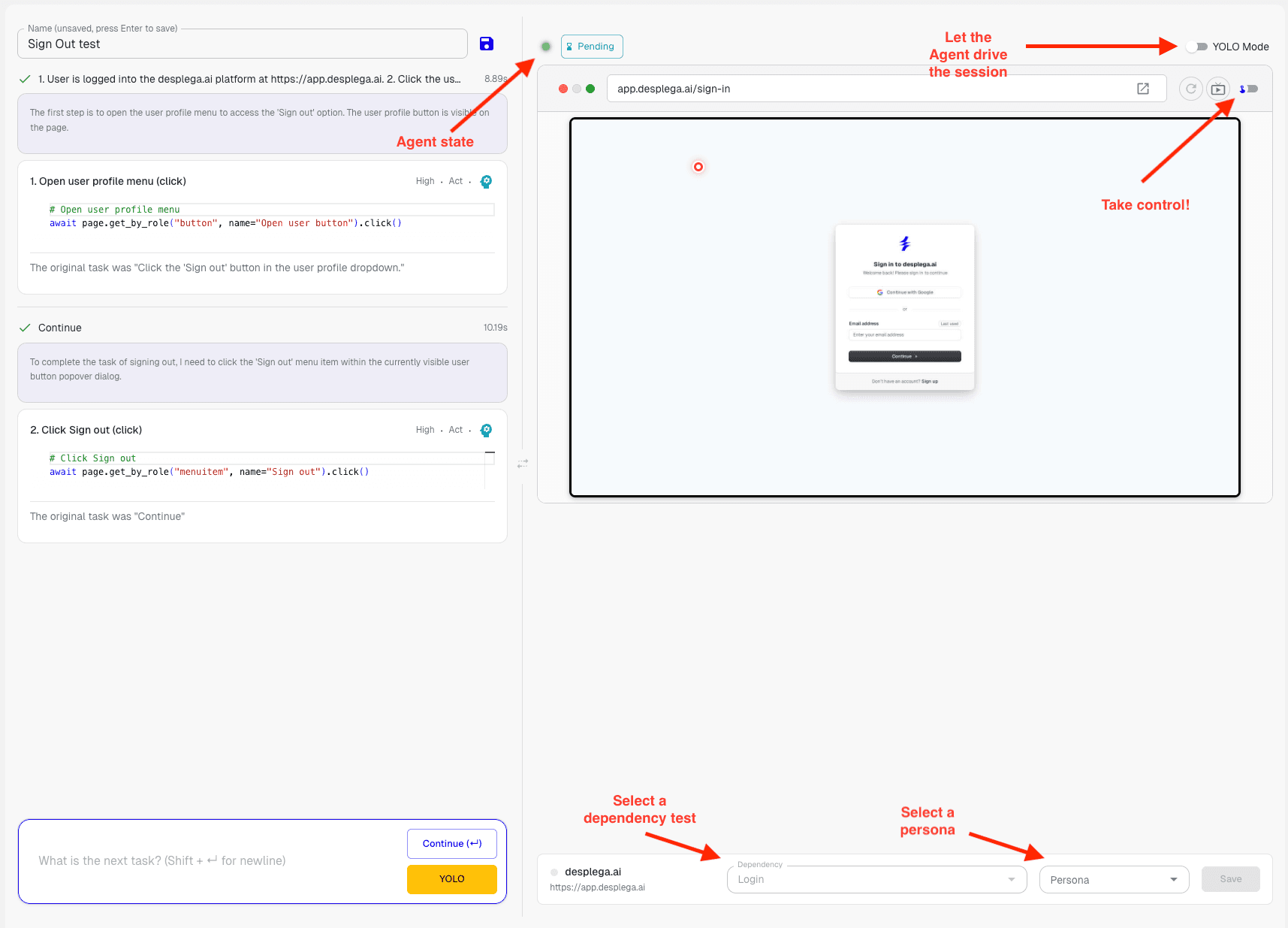
Chat-Based Interaction
- Natural Language: Describe your test requirements in plain English
- Step-by-Step Execution: Watch the agent follow your instructions in real-time
- Complex Tasks: Handle file uploads, data extraction, image validation, and calculations
Status Indicators
- Real-Time Status: See what the agent is doing at any point in time
- Pending States: Know when the agent is waiting for your input or clarification
- Activity Visibility: Track agent activity above the browser viewport
2. YOLO Mode for Autonomous Testing
YOLO mode allows the agent to attempt a long test case without frequent interruptions for questions, making it ideal for experienced users. When enabled, the agent will try to complete the entire test until it fails, reducing back-and-forth communication. We recommend using this once you're familiar with the agent's capabilities. You can always turn it back off when you need more control.
When to Use YOLO Mode
- Long Test Cases: Perfect for comprehensive test scenarios that require many steps
- Experienced Users: Best when you understand the agent's behavior and capabilities
- Autonomous Execution: Let the agent work independently until it encounters an issue
Toggle Control
- Easy Switching: Turn YOLO mode on or off as needed during your session
- Flexible Workflow: Start with guided mode, then switch to YOLO for execution
- Best Practices: Learn from failures and adjust your approach based on results
3. Test Dependencies and Personas
Before starting your test, configure the starting point and context using test dependencies and personas. These settings help the agent understand the context needed to execute tasks effectively. For example, you might want all tests to start after a successful login, or assign a UX-focused QA persona to ensure usability testing.
Test Dependencies
- Starting Points: Define a dependency test like "Login" to always start after authentication
- Reusable Context: Avoid repeating setup steps across multiple tests
- Consistent State: Ensure tests start from a known, reliable state
Personas
- Specialized Testing: Assign personas like "UX QA specialist" for usability-focused testing
- Context Assignment: Provide the agent with all the context needed for optimal task execution
- Custom Personas: Learn more about creating personas in our personas guide
4. Manual Control for Complex Test Cases
For complex test cases that require precise control, you can take over the agent and execute actions directly in the browser using our viewer. This allows you to perform the most intricate actions quickly and accurately, then hand control back to the agent to continue the test.
Manual Control Features
- Direct Browser Control: Take control and execute actions directly in the browser viewer
- Complex Actions: Handle sophisticated interactions that require human precision
- Seamless Handoff: Transition between manual control and agent execution smoothly
- Advanced Debugging: Use manual control for detailed debugging. Learn more in our debugging guide
5. MCP Integration for Local Development
With our MCP (Model Context Protocol) integration, you can create tests directly from your local development environment. This enables seamless integration with your IDE and development workflow, allowing you to trigger tests, view results, and manage runs without leaving your code editor.
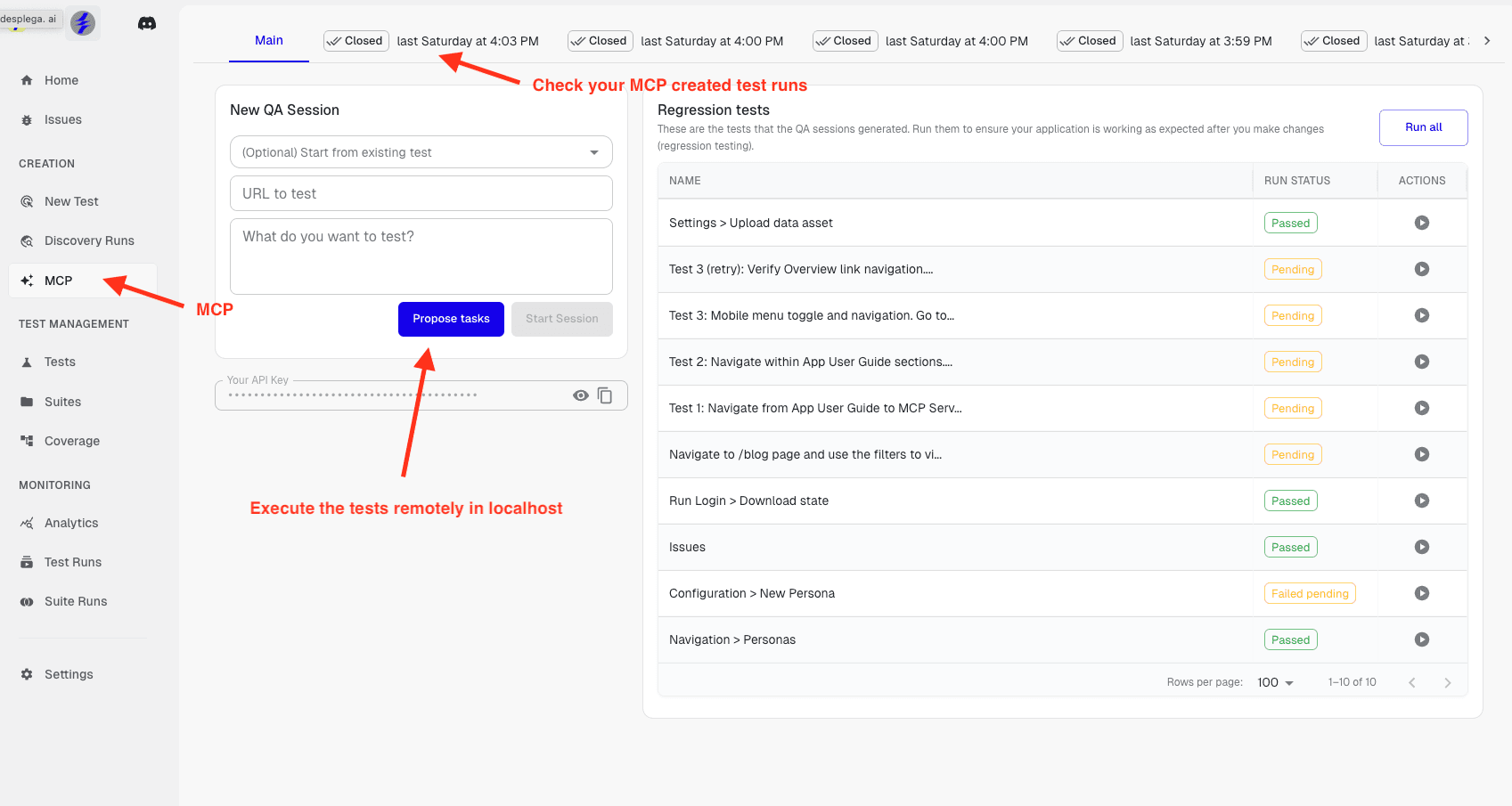
Local Development Workflow
- IDE Integration: Create and trigger tests directly from your code editor
- Remote Execution: Execute tests remotely on localhost while developing
- Seamless Workflow: Stay in your development environment without context switching
Test Management
- Real-Time Monitoring: The MCP tab shows what's happening at each point in time
- Run History: View and repeat previous test runs created via MCP
- Remote Triggering: Trigger new test runs remotely from your local environment
- Auto-Save: Tests are automatically saved as local tests—don't forget to promote them!
Promoting Tests to Production
Once your tests are created and validated, remember to promote them from local development to production. This ensures your tests are available for your team and can be run as part of your CI/CD pipeline. Tests created via MCP are automatically saved locally, but you need to promote them to make them part of your production test suite.
Benefits
- Natural Language Testing: Create tests by describing what you want in plain English, no coding required.
- Comprehensive Capabilities: Handle complex tasks like file operations, data extraction, image validation, and calculations.
- Flexible Workflow: Choose between guided interaction or autonomous YOLO mode based on your needs.
- Developer Integration: Create tests directly from your IDE with MCP integration for seamless development workflow.
- Context-Aware Testing: Use personas and dependencies to give the agent the right context for optimal test execution.