
Cursor to Claude Code: When Your AI IDE Becomes the Bottleneck Instead of the Accelerator
You mastered vibe coding in Cursor. Now your projects are outgrowing the IDE window—here's how to break free without losing momentum.
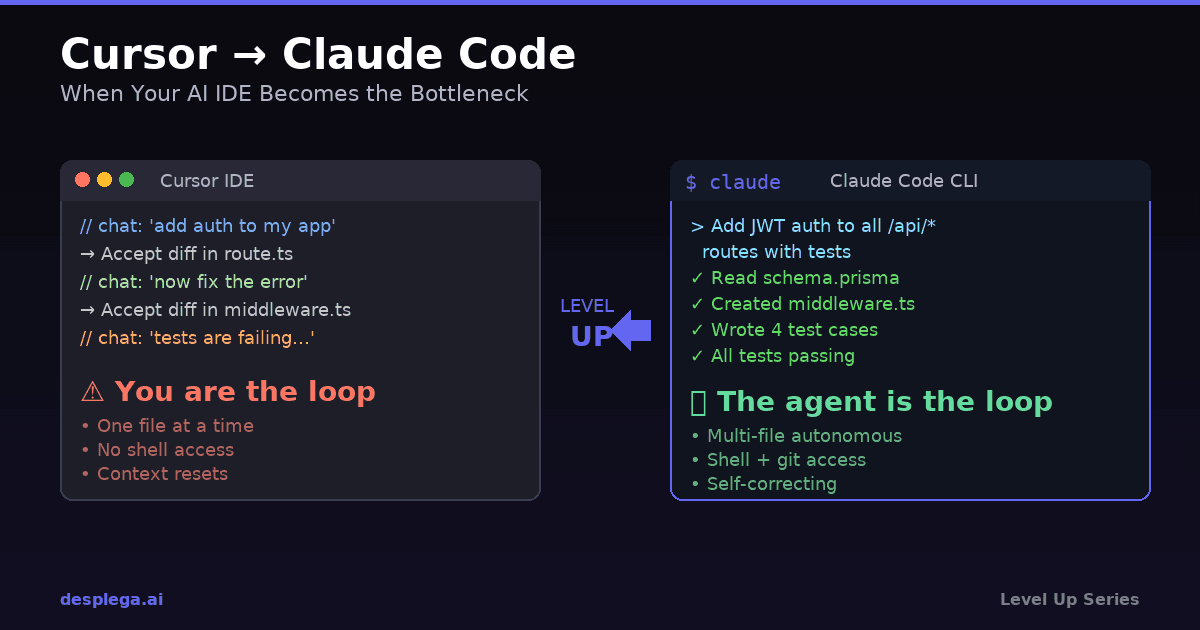
Cursor changed how you code. The inline AI completions, the chat panel that understands your codebase, the feeling of pair-programming with an AI that actually gets it—for the first time, AI coding felt natural. You shipped features faster than ever. You vibed.
But somewhere around your third serious project, something shifted. The tab completions started fighting your intent. The context window kept forgetting the architecture you explained twenty messages ago. You hit the request limit mid-flow and lost your momentum. The AI that was supposed to accelerate you started slowing you down.
You are not alone. According to the 2025 Stack Overflow Developer Survey, 76% of developers report using AI coding tools, but 38% say their AI tools “sometimes produce code that creates more work than it saves.” The bottleneck is not the AI model—it is the interface sitting between you and the model.
This guide walks you through migrating from Cursor to Claude Code—not because Cursor is bad, but because you have outgrown what a GUI-first AI IDE can do. You are ready for something that matches your ambition.
Why Do Developers Hit a Ceiling with Cursor?
Answer: Cursor excels at single-file edits but struggles with multi-file refactors, large context windows, and autonomous multi-step tasks.
Cursor is built around the IDE metaphor: you open a file, you ask the AI to change something, you accept or reject the diff. This works beautifully for localized edits—renaming a variable, adding a function, fixing a type error. But modern development rarely stays in one file.
Consider what happens when you ask Cursor to “add authentication to my Next.js app.” It needs to touch the middleware, create auth routes, update the database schema, modify your layout component, add environment variables, and update your deployment config. Cursor will attempt this one file at a time, often losing context between edits. You end up babysitting each step, which defeats the purpose of AI assistance.
A 2024 GitClear study analyzing 153 million lines of code found that AI-assisted code had a 39% higher rate of “churn”—code that gets rewritten within two weeks of being committed. Much of this churn comes from AI tools that operate without sufficient project context, generating code that technically works but does not fit the existing architecture.
The core limitations you will hit:
- Context fragmentation — Each chat session starts semi-fresh. Cursor indexes your codebase but the AI cannot hold your full project architecture in working memory during complex multi-step operations.
- Single-file editing model — The diff-based UI is designed for one file at a time. Multi-file changes require you to orchestrate each edit manually.
- No autonomous execution — Cursor cannot run your tests, check build output, read error logs, and fix issues in a loop. You are the loop.
- Request throttling — Cursor Pro limits fast requests. Hit the ceiling mid-refactor and you are stuck waiting or switching to a slower model.
- No shell access — Cursor's AI cannot install packages, run migrations, execute scripts, or interact with your dev environment directly.
What Makes Claude Code Different from an AI IDE?
Answer: Claude Code is an agentic CLI that reads, writes, and executes across your entire project—not just the file you have open.
Claude Code is not an IDE. It is a coding agent that lives in your terminal. Instead of suggesting diffs in a sidebar, it directly reads files, writes code, runs commands, checks output, and iterates—all autonomously. Think of it as the difference between a co-pilot who can only point at the map versus one who can actually drive.
| Capability | Cursor | Claude Code |
|---|---|---|
| AI interaction model | Chat panel + inline completions | Agentic CLI with full autonomy |
| Multi-file editing | One file at a time, manual orchestration | Autonomous cross-file changes |
| Shell / command execution | Separate terminal only | Built-in: runs tests, builds, scripts |
| Context persistence | .cursorrules + indexed codebase | CLAUDE.md files + session memory |
| Git operations | Basic UI integration | Full git workflow (commits, PRs, rebases) |
| Error recovery loop | You read the error, you paste it back | Reads errors, fixes, retries automatically |
| Pricing model | $20/mo with request caps | Usage-based API or $100/mo Max plan |
| IDE integration | Is the IDE (VS Code fork) | VS Code extension, JetBrains, desktop app |
Setting Up Claude Code: From Zero to Productive
The migration starts with installation. Claude Code is available as a CLI, a desktop app, and IDE extensions. Here is the fastest path:
# Install Claude Code globally
npm install -g @anthropic-ai/claude-code

# Navigate to your project
cd ~/projects/my-nextjs-app

# Launch Claude Code
claude

# First run: it will ask you to authenticate
# via your Anthropic account or API key
Once inside, Claude Code indexes your project automatically. But here is where you get an immediate advantage over Cursor: the CLAUDE.md file.
Migrating Your .cursorrules to CLAUDE.md
If you have invested time in a .cursorrules file, that knowledge transfers directly. Here is how a typical Cursor rules file maps to CLAUDE.md:
# .cursorrules (your existing file)
You are an expert in TypeScript, Next.js App Router, and Tailwind CSS.
Always use server components unless client interactivity is needed.
Use pnpm as the package manager.
Follow the existing component patterns in /components/ui/.
Write tests with Vitest and Testing Library.

# CLAUDE.md (your new file — drop this in your project root)
# Project: My SaaS App

## Stack
- Next.js 15 (App Router), TypeScript strict mode
- Tailwind CSS with shadcn/ui components in /components/ui/
- pnpm for package management

## Commands
```bash
pnpm dev          # Start dev server
pnpm build        # Production build
pnpm test         # Run Vitest suite
pnpm lint         # ESLint check
```

## Conventions
- Server components by default; add 'use client' only when needed
- Follow existing patterns in /components/ui/ for new components
- All new features need Vitest + Testing Library coverage
- Use path alias @/* for imports
The key difference: CLAUDE.md is not just instructions for the AI—it is a living document that Claude Code reads at the start of every session. You can include build commands, project structure notes, team conventions, and even known gotchas. It is like onboarding documentation that your AI assistant actually reads.
Gotcha: CLAUDE.md files are hierarchical. A root-level CLAUDE.md applies everywhere. You can add additional CLAUDE.md files in subdirectories for context-specific rules (e.g., src/api/CLAUDE.md for API-specific conventions). Claude Code merges them automatically.
The Workflow Shift: From Chat-and-Diff to Agentic Coding
Here is where the real power difference shows. In Cursor, adding a new feature looks like this:
# Cursor workflow (you are the orchestrator)
1. Open chat → "Add a /api/users endpoint"
2. Review diff → Accept changes to route.ts
3. Realize it needs a database query → Open chat again
4. "Add a Prisma query for users" → Accept diff in another file
5. Run the dev server manually → See an error
6. Copy error → Paste into chat → "Fix this error"
7. Accept diff → Run again → New error
8. Repeat steps 6-7 until it works
9. Manually run tests → They fail
10. Back to chat → Fix tests one at a time
In Claude Code, the same task:
# Claude Code workflow (the agent is the orchestrator)
> Add a /api/users endpoint with Prisma query,
  include error handling and write tests.

# Claude Code then autonomously:
# 1. Reads your schema.prisma to understand the data model
# 2. Creates the route handler with proper types
# 3. Writes the Prisma query with error handling
# 4. Creates test file with Vitest
# 5. Runs the tests → finds a failing assertion
# 6. Fixes the test → runs again → all pass
# 7. Runs your linter → fixes any style issues
# 8. Shows you a summary of all changes made
The difference is not speed—it is cognitive load. In Cursor, you are the execution loop. In Claude Code, you are the architect giving direction. You review the final result instead of micromanaging each step.
Production-Ready Example: Adding Auth Middleware
Let us walk through a real-world example. You want to add JWT authentication middleware to your Next.js app. Here is what you type into Claude Code:
> Add JWT authentication middleware to protect all /api/* routes
  except /api/auth/login and /api/auth/register.
  Use jose for JWT verification. Read the JWT_SECRET from env.
  Return 401 with a JSON error for invalid/missing tokens.
  Add tests covering: valid token, expired token, missing token,
  and excluded routes.
Claude Code will generate something like this across multiple files:
// middleware.ts
import { NextResponse } from 'next/server';
import type { NextRequest } from 'next/server';
import { jwtVerify } from 'jose';

const PUBLIC_ROUTES = ['/api/auth/login', '/api/auth/register'];

export async function middleware(request: NextRequest) {
  const { pathname } = request.nextUrl;

  // Skip non-API routes and public auth endpoints
  if (!pathname.startsWith('/api') || PUBLIC_ROUTES.includes(pathname)) {
    return NextResponse.next();
  }

  const token = request.headers.get('authorization')?.replace('Bearer ', '');

  if (!token) {
    return NextResponse.json(
      { error: 'Authentication required' },
      { status: 401 }
    );
  }

  try {
    const secret = new TextEncoder().encode(process.env.JWT_SECRET);
    const { payload } = await jwtVerify(token, secret);

    // Forward user info to API routes via headers
    const response = NextResponse.next();
    response.headers.set('x-user-id', payload.sub as string);
    return response;
  } catch (error) {
    return NextResponse.json(
      { error: 'Invalid or expired token' },
      { status: 401 }
    );
  }
}

export const config = {
  matcher: '/api/:path*',
};
Claude Code does not stop at generating the file. It will also:
- Install the
josepackage via pnpm - Add
JWT_SECRETto your .env.example - Create a comprehensive test file covering all four scenarios
- Run the tests to verify everything passes
- Flag if your existing routes might conflict with the middleware
Troubleshooting: Common Migration Issues and Fixes
Every migration has rough edges. Here are the issues Cursor users hit most often when switching to Claude Code, and how to solve them:
Problem: “Claude Code feels slow compared to Cursor’s inline completions”
This is a paradigm mismatch, not a speed issue. Cursor gives you fast micro-completions (finish this line). Claude Code gives you slower macro-completions (build this feature). For line-by-line coding, keep using your IDE’s built-in completions or Copilot. Use Claude Code for tasks that span multiple files or require reasoning.
Problem: “Claude Code modified files I did not want it to touch”
Use permission controls. Run Claude Code with --allowedTools to restrict which tools it can use, or configure your settings to require approval before file writes. You can also add a .claudeignore file (works like .gitignore) to exclude sensitive directories.
Problem: “I miss seeing the diff before it is applied”
Claude Code shows you diffs interactively and asks for permission before writing files (in the default permission mode). You can also review all changes after a session with git diff. For maximum control, work on a feature branch and review the full diff before merging.
Problem: “Claude Code keeps losing context about my project”
This means your CLAUDE.md is underdeveloped. Add your architecture decisions, key file paths, common commands, and non-obvious conventions. Claude Code reads CLAUDE.md at session start—the richer it is, the less you need to repeat yourself. Think of it as writing docs for your AI teammate.
Problem: “My Cursor keyboard shortcuts do not work”
Claude Code is terminal-native, so keyboard shortcuts are different. Key commands:Ctrl+C to interrupt,Escape to cancel the current generation, /help for the full command list. If you use the VS Code extension, many familiar shortcuts carry over.
Edge Cases and Gotchas to Watch For
- Monorepos: Claude Code handles monorepos well, but you should have a CLAUDE.md at the root explaining the workspace structure. Without it, the agent may confuse packages or import from the wrong workspace.
- Large binary files: Claude Code can read images and PDFs, but avoid asking it to process large binary assets. Keep those in .claudeignore.
- Environment variables: Claude Code can read your .env files to understand your configuration, but it follows security best practices and will not expose secrets in outputs. Be mindful of what you commit.
- Long-running dev servers: If you need Claude Code to start a dev server and then test against it, it handles background processes natively. But be aware that very long sessions can approach context limits—use compact mode for extended work.
- Cursor AI rules are not 1:1: Cursor’s system prompt injection (.cursorrules) supports some Cursor-specific directives that have no CLAUDE.md equivalent. Strip out any Cursor-specific formatting instructions during migration.
The Hybrid Workflow: Best of Both Worlds
Here is a secret: you do not have to choose. Many professional developers run both tools. The sweet spot looks like this:
- Cursor (or any IDE) — Quick edits, visual file browsing, inline completions, debugging with breakpoints, CSS tweaking with live preview
- Claude Code — Feature implementation, refactoring across files, writing and running tests, git workflows (commits, PRs, rebases), investigating bugs with log analysis, setting up infrastructure
# A typical hybrid workflow day:

# Morning: Use Claude Code for the heavy lifting
> Refactor the payment module to use Stripe's new
  Payment Intents API. Update all tests.
  # Claude Code handles 12 files autonomously

# Afternoon: Switch to Cursor for polish
# - Tweak button styling with live preview
# - Fix a typo caught in code review
# - Adjust a component's padding

# End of day: Back to Claude Code
> Review all changes made today, write a commit message
  that explains the Stripe migration, and create a PR
  with a detailed description.
This is not about replacing one tool with another. It is about using each tool where it excels. Cursor is a fantastic code editor with AI features. Claude Code is a fantastic AI agent that happens to edit code. Those are different things.
Realistic Time Estimate
Every migration has a productivity dip. Here is what a realistic timeline looks like for a developer switching from Cursor to Claude Code as their primary AI tool:
- Setup and first session (30–60 min) — Installing Claude Code, writing your initial CLAUDE.md, and completing your first agentic task. Most developers are productive within the first hour.
- CLAUDE.md refinement (1–2 hours over the first week) — As you work, you will keep adding project context, commands, and conventions to your CLAUDE.md. This investment pays dividends in every future session.
- Workflow adjustment (3–5 days) — Shifting from “chat and accept diffs” to “describe and review results” takes a few days of practice. You will catch yourself reaching for the chat panel before remembering you can just ask Claude Code to handle the whole task.
- Full comfort (1–2 weeks) — By week two, most developers report feeling faster than they were in Cursor alone, especially on multi-file tasks, refactors, and git workflows.
A 2025 JetBrains Developer Ecosystem survey found that developers switching between AI coding tools reported a 2–5 day adjustment period. The learning curve with Claude Code is gentle because you already understand AI-assisted development—you are just upgrading the interface.
Making the Transition Stick
The biggest risk in any tool migration is reverting to old habits when things get hard. Here is how to make the transition permanent:
- Start with one project. Do not migrate everything at once. Pick your next new feature or side project and build it entirely with Claude Code.
- Invest in your CLAUDE.md on day one. Spend 15 minutes writing a thorough CLAUDE.md. This single file determines 80% of your Claude Code experience quality.
- Use git branches aggressively. Claude Code integrates with git natively. Create feature branches, let the agent work, review the diff, merge or discard. The safety net makes experimentation free.
- Track your velocity. After two weeks, compare: how many features did you ship? How many files did you touch? How many bugs shipped to production? The numbers will speak for themselves.
Key Takeaways
- Cursor is not the problem — GUI-first AI IDEs are great for localized edits. You outgrow them when your tasks span multiple files and require autonomous execution.
- CLAUDE.md is your superpower — Invest 15 minutes writing a thorough CLAUDE.md on day one. It replaces .cursorrules and gives Claude Code persistent project context across every session.
- You do not have to choose — The hybrid workflow (Cursor for visual edits, Claude Code for multi-file tasks and git operations) gives you the best of both worlds.
- The shift is in who runs the loop — In Cursor, you orchestrate each step. In Claude Code, you describe the outcome and review the result. Same skills, different leverage.
- The adjustment period is short — Most developers feel equally productive within a week and faster within two. Your AI coding instincts transfer directly.
You mastered vibe coding. You pushed the limits of what an AI IDE could do for you. Now it is time to remove the ceiling. Claude Code does not replace the instincts you built in Cursor—it amplifies them across your entire project, your entire workflow, and your entire development lifecycle.
The bottleneck was never the AI. It was the interface. Time to level up.
Ready to level up your dev toolkit?
Desplega.ai helps developers in Barcelona, Madrid, Valencia, and across Spain transition from AI IDEs to professional CLI-first tools smoothly. Get personalized migration guidance and automated testing for your workflow.
Get StartedFrequently Asked Questions
Can I use Cursor and Claude Code together on the same project?
Yes. Many developers keep Cursor for visual editing and use Claude Code for complex refactors, git operations, and multi-file changes. They complement each other well via the VS Code extension.
How much does Claude Code cost compared to Cursor Pro?
Cursor Pro is $20/month with request limits. Claude Code uses usage-based pricing through an Anthropic API key or a Max subscription at $100/month with generous limits for heavy usage.
Will I lose my Cursor AI chat history when migrating to Claude Code?
Cursor chat history stays in Cursor. Claude Code maintains its own conversation context per session. Use CLAUDE.md files to persist project context across sessions permanently.
Does Claude Code work with VS Code or only the terminal?
Claude Code runs as a CLI in any terminal, but also has official extensions for VS Code and JetBrains IDEs plus a desktop app. You can integrate it into your existing editor setup seamlessly.
What happens to my Cursor rules files when I switch to Claude Code?
Cursor rules (.cursorrules) translate naturally to CLAUDE.md files. Copy your project conventions, coding standards, and architectural notes into a CLAUDE.md at your project root for identical behavior.
Related Posts
When I Reject v0 Code: Pattern-Matching Rules for Safer UI Generation
A practical v0 review gate for safer generated React UI: AST checks, Playwright smoke tests, accessibility rules, and rejection signals.
Cody's Repository Indexing: Does Cognitive Offloading Create Knowledge Gaps in Large Codebases? | Desplega AI
A practical deep dive into Cody repository indexing, context retrieval, and how indie hackers avoid AI-created knowledge gaps.
Hot Module Replacement: Why Your Dev Server Restarts Are Killing Your Flow State | desplega.ai
Stop losing 2-3 hours daily to dev server restarts. Master HMR configuration in Vite and Next.js to maintain flow state, preserve component state, and boost coding velocity by 80%.