
Testcontainers: Stop Mocking Your Database — Spin Up the Real Thing in Your Tests
Your mocks passed. Production didn't. There's a better way.
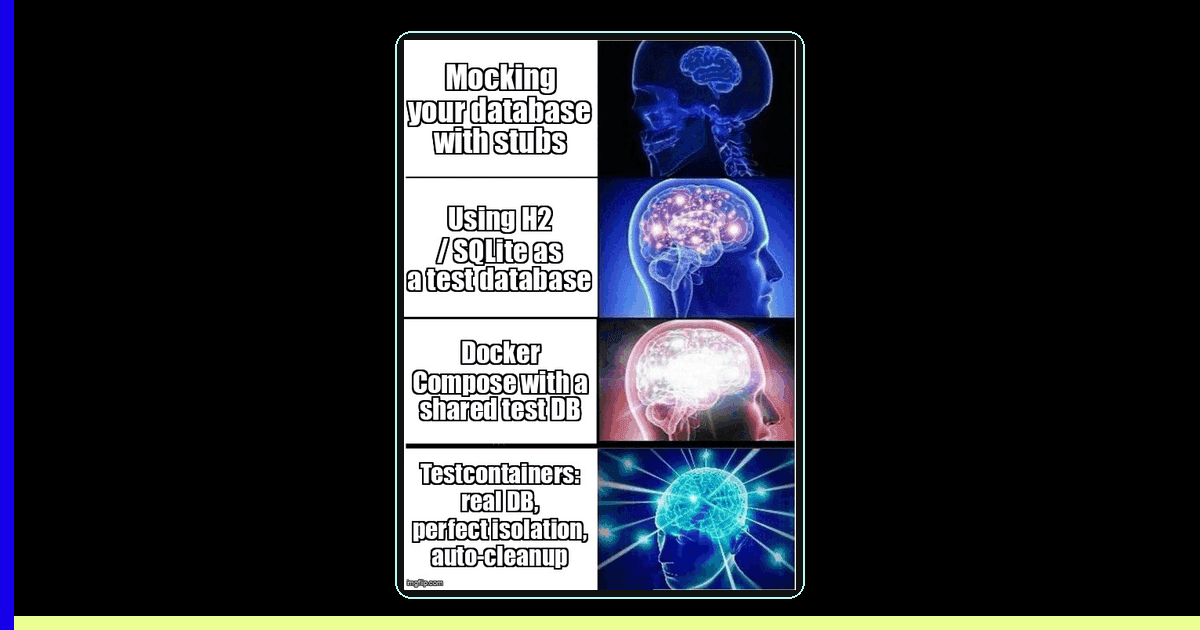
TL;DR: Mocking your database in tests creates a dangerous illusion of correctness. Testcontainers lets you spin up real PostgreSQL, MySQL, Redis, Kafka, and more as throwaway Docker containers in your test suite — giving you production-faithful integration tests without the infrastructure headache. With 30,900+ Java dependents and Docker's acquisition of AtomicJar, this is the tool your test suite has been missing.
The Mock-Production Gap: A \$400K Lesson
A fintech team in Barcelona shipped their payment processing service with full test coverage. Every test passed. Unit tests mocked the PostgreSQL queries. Integration tests used an in-memory H2 database. CI was green. Production was not.
The issue? H2 doesn't support PostgreSQL's ON CONFLICT clause. Their upsert logic — tested and passing against H2 for months — silently produced duplicate transactions in production. By the time they caught it, they'd processed \$400K in duplicate charges. The mocks lied. The tests passed. Production broke.
This is the mock-production gap: the space between what your test environment simulates and what your production infrastructure actually does. And it's where the most expensive bugs hide.
The Core Problem
According to the 2024 State of Testing Report by JetBrains, 54% of developers now use container-based testing, up from 31% in 2021. The reason? Teams learned the hard way that mock-based integration tests give false confidence. Real databases have real quirks — and your tests need to exercise them.
What Is Testcontainers and Why Should You Care?
Testcontainers is an open-source library that provides lightweight, throwaway Docker container instances of real databases, message brokers, browsers, and virtually any service that runs in Docker. Instead of mocking your PostgreSQL database, you spin up a real PostgreSQL container. Instead of simulating Kafka, you run actual Kafka. Your tests talk to real infrastructure that starts in seconds and disappears when the test finishes.
Originally created for Java, Testcontainers now has official libraries for Node.js, Python, Go, .NET, and Rust. In 2023, Docker acquired AtomicJar — the company behind Testcontainers — signaling that container-based testing is now a first-class citizen in the Docker ecosystem. The Java library alone has over 30,900 dependents on Maven Central (source: Maven Repository, 2025).
How does Testcontainers compare to other testing approaches?
Testcontainers replaces fake databases with real ones in Docker, eliminating SQL dialect mismatches and giving tests production-faithful behavior.
| Approach | Production Fidelity | Speed | Isolation | Setup Complexity |
|---|---|---|---|---|
| Mocks / Stubs | Very Low | Fastest | Perfect | Low |
| H2 / SQLite | Low — SQL dialect gaps | Fast | Good | Low |
| Docker Compose | High | Slow startup | Shared state risk | High |
| Shared test DB | High | Fast (no startup) | Poor — test pollution | Medium |
| Testcontainers | Production-identical | 2-5s startup | Perfect per-test | Low (library handles it) |
The key insight: Testcontainers gives you the fidelity of a real database with the isolation of mocks. Docker Compose gets you the real database but shares state across tests. Mocks give you isolation but not fidelity. Testcontainers gives you both.
Getting Started: Your First Testcontainer
Let's start with a practical Node.js example using the @testcontainers/postgresql module. This test spins up a real PostgreSQL instance, runs a migration, inserts data, and verifies the query — all against real PostgreSQL, not a mock.
// user-repository.integration.test.ts
import { PostgreSqlContainer, StartedPostgreSqlContainer } from '@testcontainers/postgresql';
import { Client } from 'pg';
import { UserRepository } from './user-repository';

describe('UserRepository (Testcontainers)', () => {
  let container: StartedPostgreSqlContainer;
  let client: Client;
  let repo: UserRepository;

  beforeAll(async () => {
    // Spin up a real PostgreSQL container — takes ~3 seconds
    container = await new PostgreSqlContainer('postgres:16-alpine')
      .withDatabase('testdb')
      .withUsername('testuser')
      .withPassword('testpass')
      .start();

    // Connect using the dynamically assigned port
    client = new Client({
      host: container.getHost(),
      port: container.getPort(),
      database: container.getDatabase(),
      user: container.getUsername(),
      password: container.getPassword(),
    });
    await client.connect();

    // Run migrations against the real database
    await client.query(`
      CREATE TABLE users (
        id SERIAL PRIMARY KEY,
        email VARCHAR(255) UNIQUE NOT NULL,
        name VARCHAR(255) NOT NULL,
        created_at TIMESTAMP DEFAULT NOW()
      )
    `);

    repo = new UserRepository(client);
  }, 30000); // Allow time for container startup

  afterAll(async () => {
    await client.end();
    await container.stop();
  });

  it('should insert and retrieve a user', async () => {
    const user = await repo.create({ email: 'ada@test.com', name: 'Ada Lovelace' });

    expect(user.id).toBeDefined();
    expect(user.email).toBe('ada@test.com');

    const found = await repo.findByEmail('ada@test.com');
    expect(found).toEqual(user);
  });

  it('should enforce unique email constraint', async () => {
    await repo.create({ email: 'unique@test.com', name: 'First' });

    // This tests REAL PostgreSQL constraint behavior — mocks can't do this
    await expect(
      repo.create({ email: 'unique@test.com', name: 'Duplicate' })
    ).rejects.toThrow(/duplicate key/);
  });

  it('should handle ON CONFLICT upsert correctly', async () => {
    await repo.create({ email: 'upsert@test.com', name: 'Original' });
    const updated = await repo.upsert({ email: 'upsert@test.com', name: 'Updated' });

    // This is the exact scenario that breaks with H2/SQLite
    expect(updated.name).toBe('Updated');
    expect(updated.email).toBe('upsert@test.com');
  });
});
Notice the key differences from a mock-based test: you're testing real PostgreSQL constraint enforcement, real SQL dialect behavior, and real upsert semantics. If your production database is PostgreSQL 16, your test runs against PostgreSQL 16.
What are the best practices for Testcontainers performance?
Use container reuse, parallel execution, and shared fixtures to keep Testcontainers fast — most suites add only 3-5 seconds of overhead.
The most common complaint about Testcontainers is speed. Here are three proven patterns for keeping your suite fast.
1. Container Reuse Across Tests
Instead of starting a new container per test, share one container across the entire test suite and reset state between tests with transactions or truncation.
// global-setup.ts — Start container once, reuse across all test files
import { PostgreSqlContainer } from '@testcontainers/postgresql';

let container;

export async function setup() {
  container = await new PostgreSqlContainer('postgres:16-alpine')
    .withReuse()          // Enable container reuse across test runs
    .withDatabase('testdb')
    .start();

  // Expose connection string for all tests
  process.env.DATABASE_URL = container.getConnectionUri();
}

export async function teardown() {
  // Container persists if withReuse() is enabled — Docker manages cleanup
}

// In each test file, wrap tests in transactions for isolation:
describe('OrderService', () => {
  let client: Client;

  beforeEach(async () => {
    client = new Client({ connectionString: process.env.DATABASE_URL });
    await client.connect();
    await client.query('BEGIN');  // Start transaction
  });

  afterEach(async () => {
    await client.query('ROLLBACK');  // Roll back — clean slate for next test
    await client.end();
  });

  it('should calculate order total with tax', async () => {
    // Test runs against real PostgreSQL, rolls back automatically
    await client.query(
      "INSERT INTO orders (product, amount) VALUES ('Widget', 29.99)"
    );
    const result = await client.query(
      'SELECT amount * 1.21 AS total FROM orders'
    );
    expect(parseFloat(result.rows[0].total)).toBeCloseTo(36.29);
  });
});
2. Parallel Test Execution
Testcontainers pairs naturally with parallel test execution. Each worker gets its own container, guaranteeing zero test pollution.
// jest.config.ts — Parallel workers, each with isolated containers
export default {
  maxWorkers: 4,
  globalSetup: './global-setup.ts',
  // Each worker gets its own container via worker-specific setup
  projects: [
    {
      displayName: 'integration',
      testMatch: ['**/*.integration.test.ts'],
      setupFilesAfterFramework: ['./per-worker-setup.ts'],
    },
  ],
};

// per-worker-setup.ts
import { PostgreSqlContainer } from '@testcontainers/postgresql';

beforeAll(async () => {
  const container = await new PostgreSqlContainer('postgres:16-alpine').start();
  // Each Jest worker gets a unique port — no collisions
  process.env.DATABASE_URL = container.getConnectionUri();
}, 30000);
3. Multi-Container Stacks
Need PostgreSQL + Redis + Kafka for a service test? Compose them programmatically.
// multi-container-setup.ts
import { PostgreSqlContainer } from '@testcontainers/postgresql';
import { GenericContainer } from 'testcontainers';

export async function setupInfrastructure() {
  // Start all containers in parallel — saves ~60% startup time
  const [postgres, redis, kafka] = await Promise.all([
    new PostgreSqlContainer('postgres:16-alpine').start(),
    new GenericContainer('redis:7-alpine')
      .withExposedPorts(6379)
      .start(),
    new GenericContainer('confluentinc/cp-kafka:7.5.0')
      .withExposedPorts(9092)
      .withEnvironment({
        KAFKA_BROKER_ID: '1',
        KAFKA_OFFSETS_TOPIC_REPLICATION_FACTOR: '1',
        KAFKA_PROCESS_ROLES: 'broker,controller',
        KAFKA_NODE_ID: '1',
        KAFKA_CONTROLLER_QUORUM_VOTERS: '1@localhost:29093',
        KAFKA_LISTENERS: 'PLAINTEXT://:9092,CONTROLLER://:29093',
        KAFKA_CONTROLLER_LISTENER_NAMES: 'CONTROLLER',
        CLUSTER_ID: 'test-cluster-id',
      })
      .start(),
  ]);

  return {
    databaseUrl: postgres.getConnectionUri(),
    redisUrl: `redis://${redis.getHost()}:${redis.getMappedPort(6379)}`,
    kafkaBroker: `${kafka.getHost()}:${kafka.getMappedPort(9092)}`,
  };
}
CI/CD Configuration: Making It Work in Your Pipeline
Testcontainers requires Docker access in your CI environment. Here's how to configure the most common CI providers.
| CI Provider | Docker Support | Configuration |
|---|---|---|
| GitHub Actions | Native on ubuntu runners | Works out of the box — no extra config |
| GitLab CI | DinD or socket binding | Use services: [docker:dind] |
| Jenkins | Docker agent or socket | Mount /var/run/docker.sock |
| CircleCI | Machine executor | Use machine: true for Docker access |
GitHub Actions example:
# .github/workflows/integration-tests.yml
name: Integration Tests
on: [push, pull_request]

jobs:
  test:
    runs-on: ubuntu-latest
    steps:
      - uses: actions/checkout@v4
      - uses: actions/setup-node@v4
        with:
          node-version: '20'
      - run: npm ci
      - run: npm run test:integration
        env:
          TESTCONTAINERS_RYUK_DISABLED: 'false'  # Keep Ryuk for cleanup
          DOCKER_HOST: unix:///var/run/docker.sock
Edge Cases and Gotchas
Testcontainers is powerful but not without pitfalls. Here are the issues that catch teams off guard.
- Port conflicts: Testcontainers uses random ports by default. Never hardcode ports. Always use
container.getMappedPort()to get the dynamically assigned host port. - Container startup timeouts: First run downloads the Docker image, which can be slow. Set a generous
startupTimeout(30s+) and consider pre-pulling images in CI. - Docker Desktop licensing: Docker Desktop requires a paid license for companies with 250+ employees. Consider Colima, Rancher Desktop, or Podman as alternatives on macOS.
- Apple Silicon (M1/M2/M3): Some container images don't have ARM builds. Use
.withPlatform('linux/amd64')for x86 emulation, but expect 2-3x slower startup. - Ryuk container cleanup: Testcontainers runs a "Ryuk" sidecar to garbage-collect orphaned containers. Some CI environments block this. Set
TESTCONTAINERS_RYUK_DISABLED=trueif needed, but ensure manual cleanup. - Database state leaks: If you share a container across tests without transaction rollback or truncation, test order dependencies will haunt you. Always clean up.
- Memory pressure: Each container consumes real memory. Running 10+ containers in parallel on a CI machine with 4GB RAM will cause OOM kills. Profile your resource usage.
Troubleshooting and Debugging
When Testcontainers doesn't behave as expected, here's how to diagnose the issue.
Container won't start
- Verify Docker is running:
docker info - Check available disk space — Docker images need room
- Look at container logs:
container.logs()returns stdout/stderr - Increase startup timeout with
.withStartupTimeout(60000)
Connection refused errors
- Never use
localhost:5432— usecontainer.getHost()andcontainer.getPort() - Wait for the container's health check to pass before connecting
- In CI, ensure the Docker network is accessible from the test runner
Tests pass locally but fail in CI
- Check if CI has Docker access — serverless runners often don't
- Verify the Docker socket path: some CI uses
/var/run/docker.sock, others use TCP - Check
TESTCONTAINERS_HOST_OVERRIDEif running Docker-in-Docker - Ensure CI has enough memory — containers are real processes consuming real RAM
Enabling debug logs
// Enable verbose logging to see container lifecycle events
import { TestContainers } from 'testcontainers';

// Set log level before starting containers
process.env.DEBUG = 'testcontainers*';

// Or inspect a specific container's output
const container = await new PostgreSqlContainer().start();
const logs = await container.logs();
console.log('Container stdout:', (await logs.toArray()).join(''));
When Not to Use Testcontainers
Testcontainers isn't always the right answer. Keep using mocks and stubs for:
- Pure unit tests: Testing business logic that doesn't touch infrastructure. A function that calculates tax doesn't need a real database.
- Third-party API tests: You can't containerize Stripe or Twilio. Use contract testing or recorded fixtures instead.
- Performance-sensitive fast feedback loops: If your team runs tests on every keystroke, the 2-5 second container startup matters. Reserve Testcontainers for the integration test stage of your pipeline.
- Environments without Docker: Some corporate environments restrict Docker access. In these cases, managed test databases or cloud-based test environments are alternatives.
The Testing Pyramid with Testcontainers
Testcontainers doesn't replace your testing pyramid — it sharpens it. Unit tests still form the base with mocks for pure logic. But the integration layer — the layer that has traditionally been the most unreliable — now runs against real infrastructure. Teams adopting Testcontainers consistently report catching bugs that mock-based tests missed for months.
Key Takeaway
Your mocks are a liability. Every mock is an assumption about how production behaves. Every assumption is a potential bug. Testcontainers lets you replace assumptions with evidence — real databases, real queries, real behavior. The 3-second startup cost is nothing compared to a \$400K production incident.
References
- Testcontainers Official Documentation — testcontainers.com
- JetBrains 2024 State of Testing Report — Developer Ecosystem Survey
- Maven Repository — Testcontainers dependency statistics (30,900+ dependents)
- Docker Blog — AtomicJar Acquisition Announcement (2023)
Ready to strengthen your test automation?
Desplega.ai helps QA teams build robust test automation frameworks with real infrastructure testing, eliminating the mock-production gap that causes deployment failures.
Get StartedFrequently Asked Questions
What is Testcontainers and how does it work?
Testcontainers is a library that spins up real Docker containers (databases, message brokers, etc.) as throwaway instances during tests, giving each test isolated real infrastructure instead of mocks.
Does Testcontainers slow down my test suite?
Initial container startup adds 2-5 seconds, but container reuse mode and parallel execution minimize overhead. Most teams find the tradeoff worthwhile vs. debugging mock-production divergence bugs.
Can I use Testcontainers in CI/CD pipelines like GitHub Actions?
Yes. Most CI providers support Docker. For GitHub Actions, use ubuntu runners. For Jenkins, enable Docker-in-Docker. Some serverless CI environments may need socket configuration or alternatives.
What languages does Testcontainers support?
Testcontainers has official libraries for Java, Node.js, Python, Go, .NET, and Rust. The Java library is the most mature with 30,900+ dependents. Each follows the same container lifecycle pattern.
Should I replace all my mocks with Testcontainers?
No. Use Testcontainers for integration tests that verify real infrastructure behavior (queries, migrations, transactions). Keep unit test mocks for pure business logic. The testing pyramid still applies.
Related Posts
When I Reject v0 Code: Pattern-Matching Rules for Safer UI Generation
A practical v0 review gate for safer generated React UI: AST checks, Playwright smoke tests, accessibility rules, and rejection signals.
Cody's Repository Indexing: Does Cognitive Offloading Create Knowledge Gaps in Large Codebases? | Desplega AI
A practical deep dive into Cody repository indexing, context retrieval, and how indie hackers avoid AI-created knowledge gaps.
Hot Module Replacement: Why Your Dev Server Restarts Are Killing Your Flow State | desplega.ai
Stop losing 2-3 hours daily to dev server restarts. Master HMR configuration in Vite and Next.js to maintain flow state, preserve component state, and boost coding velocity by 80%.