
Self-Healing Tests
Stop letting flaky tests slow you down. Desplega.ai's Self-Healing Tests automatically adapt to changes in your application, reducing test maintenance and improving reliability.
How It Works
What is Self-Healing?
When you run a test and it fails, desplega.ai can automatically detect what went wrong and fix it for you. Instead of manually debugging why a button click failed or a form field couldn't be found, the AI analyzes the failure and applies fixes in real-time. Our AI-powered engine detects when a test fails due to changes in the UI (e.g., a button is renamed or moved) or when tests become flaky. It then automatically updates the test to reflect the new UI, allowing the test to pass without any manual intervention. Self-healing can be triggered on-demand or automatically when flakiness is detected.
1. Where to See Self-Healing in Tests
Navigate to any test in your suite to access self-healing capabilities. In the test details view, you'll find comprehensive tools for managing and triggering self-healing functionality.

Self-Healing On-Demand
- Top Right Button: Trigger self-healing manually from the test details page
- Immediate Action: Instantly attempt to fix failing tests without waiting for flakiness detection
- Visible Indicators: Self-healing button is clearly accessible in the test header
Runs Tab Overview
- Re-Run Indicators: See which runs are re-runs after self-healing attempts
- Flakiness Detection: Automatically detect when tests become flaky and need attention
- Status Tracking: Monitor run statuses including passed, failed, and flaky runs
2. Auto Self-Healing on Flaky Tests
When a test run is detected as flaky, the system automatically triggers a self-healing process. The Triage tab provides detailed information about the flaky detection and shows the results of the auto self-healing attempt in the Re-runs section.
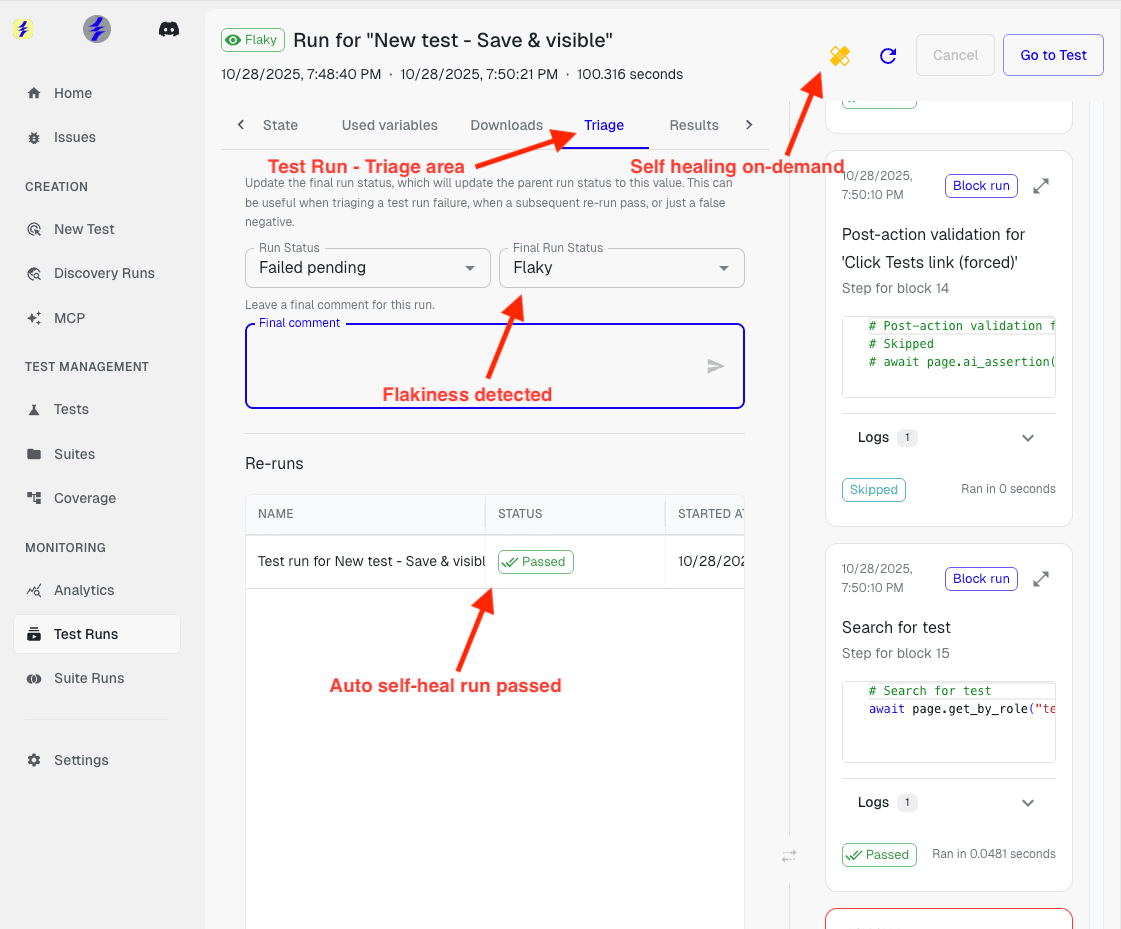
Triage Tab
- Final Run Status: View the detected status - in this case, "Flaky"
- Status Management: Update run status and leave comments for triage notes
- On-Demand Healing: Self-healing button remains available for manual triggers
Re-Runs Section
- Auto Self-Heal Results: See which re-runs were triggered by automatic self-healing
- Passed Runs: Automatically healed runs that passed are clearly indicated
- Run History: Track the complete history of runs and self-healing attempts
What Happens During Auto-Fix
- The test runs normally until it hits a problem
- When a step fails, the AI analyzes:
- • The error message
- • What's currently visible on the page
- • What the test was trying to do
- The AI tries multiple fixing strategies automatically
Two Types of Fixes
The self-healing system uses a multi-tier approach to fix test failures, starting with quick fixes and progressing to deeper analysis if needed. At a high level, there are two types of fixes: quick fixes and deep fixes.
Quick Fixes
- Updates button selectors that changed (e.g.,
.submit-btn→.submit-button) - Adjusts timing for slow-loading elements
- Finds alternative ways to locate elements
Deep Fixes
- Handles unexpected popups by closing them first
- Navigates around application changes
- Inserts additional steps needed to complete the action
- Analyzes the full page context to understand what changed
See What Was Fixed
After running with auto-fix, you can easily identify when and how self-healing was applied to your tests.
- Healing Icon: After running with auto-fix, look for the healing icon on your test run
- Icon Indicator: The icon indicates that fixes were applied during that run
- Auto-Fix Column: Check the "Auto-Fix" column in your test runs list to see which runs used self-healing
- Automatic Updates: If the fix worked, your test definition is automatically updated with the corrected steps
When Self-Healing Helps Most
Self-healing is particularly effective in these common scenarios where tests fail due to application changes rather than actual bugs.
UI Changes
Your app's UI changed (button text, CSS classes, layouts)
Unexpected Popups
Unexpected popups or modals appear during test execution
Timing Issues
Elements load at different speeds, causing timing-related failures
Selector Breaks
Minor application changes that break selectors without affecting functionality
Failure After All Attempts
If the AI tries all fixing strategies and still can't make the test pass, it marks the test as failed. This usually means there's a real bug in your application that needs human attention, not just a broken test selector. The system has exhausted its automated fixing capabilities, indicating a deeper issue that requires developer intervention.
Benefits
- Reduce Test Maintenance: Spend less time fixing broken tests and more time building features.
- Improve Test Reliability: Ensure that your tests are always up-to-date and reliable.
- Automatic Flakiness Resolution: Flaky tests are automatically detected and healed without manual intervention.
- Increase Confidence: Ship new features with confidence, knowing that your tests will automatically adapt to any changes.