
1
Create Your First Test
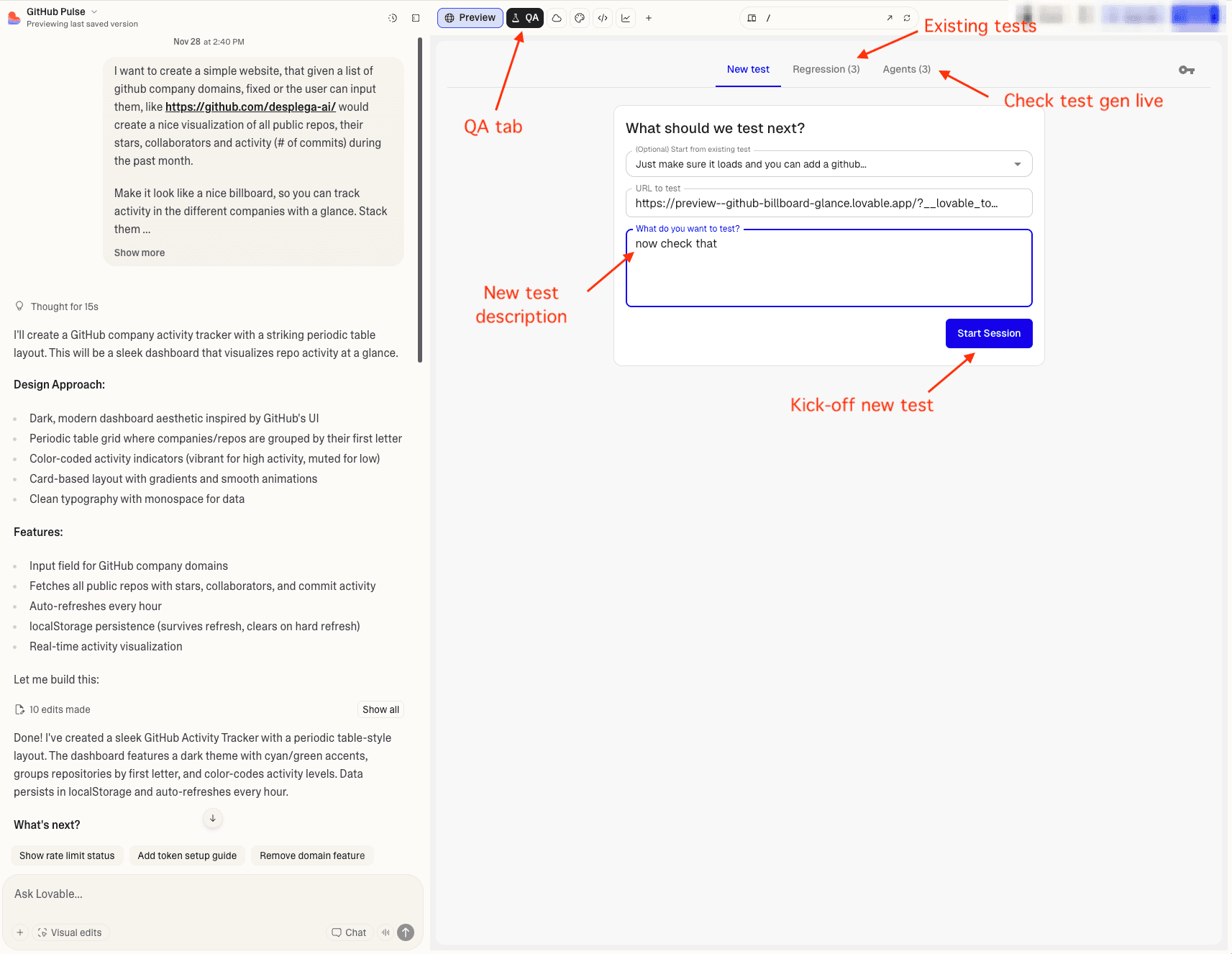
Click Create New Test or New Test.
You'll see a test creation form with:
- (Optional) Start from existing test: Select a previous test to build upon
- URL to test: Which page to test (usually auto-filled with your Lovable.dev preview URL)
- What do you want to test?: Describe what the test should do
2
Write a Simple Test
Let's create a basic test. Fill in:
(Optional) Start from existing test: Leave this blank for your first test
URL to test (auto-filled)
What do you want to test?:
Navigate to the homepage and verify:
1. Page loads without errors
2. Main heading is visible
3. Navigation menu is present
Click Start Session.
Common Test Patterns for Lovable.dev Projects
Form Validation
Try to submit the form empty and verify error messages appear, then fill one field at a time and verify errors clear when fixed, and finally submit with all valid data and verify success.Navigation
Click each menu item and verify the correct page loads, the URL changes, and the active state appears on the current item.Responsive Design
Resize the viewport to mobile size, verify the hamburger menu appears, click it to open the menu, then click menu items and verify navigation works correctly.Related Guides
Vibe QA Extension
Power your vibe coding workflow with AI-powered QA testing. The Desplega.ai Vibe QA Extension integrates seamlessly with Lovable, bringing enterprise-grade testing directly into your development workflow.
Vibe QA Installation
Step-by-step guide to install the Vibe QA Extension in Chrome. Configure your API key and start testing your Lovable projects with AI-powered QA automation.
Watch the Magic
Watch as Vibe QA attempts to execute your test autonomously. Understand how the agent interacts with your application in real-time.