
Iterative Testing Workflow
Build, test, fix, and iterate with confidence
Here's how to use Vibe QA as you build:
Managing Your Tests: The Regression Tab
Once you've created and saved tests, you can manage them all from the Test Regression tab. This powerful feature lets you maintain and run tests across multiple sites.
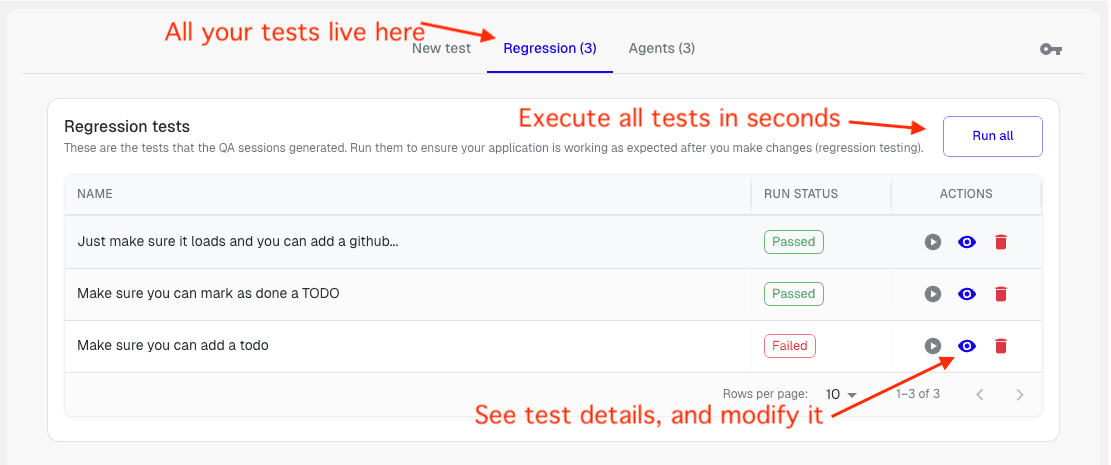
What You Can Do:
- Re-run All Tests: Execute all your saved tests with a single click to ensure nothing broke
- View Test Details: Click on any test to see its full execution history, results, and status
- Delete Tests: Remove tests that are no longer needed
- Modify Tests: Update test descriptions or configurations as your application evolves
- Multi-Site Support: Manage and run tests for multiple websites or applications simultaneously—perfect for testing different environments or projects
The regression tab is your central hub for maintaining test coverage across all your projects, making it easy to catch regressions before they reach production.
Your Iterative Workflow
As you add new features to your application, you can easily maintain and expand your test coverage:
- Add New Tests: When you add a new feature, create a new test to verify it works correctly (see Your First Test for guidance)
- Re-run Existing Tests: Use the Regression tab to re-run all your saved tests whenever you make changes, ensuring you haven't broken anything
- Review Results: Check test results to identify any regressions or issues introduced by your changes
- Fix and Iterate: If tests fail, use the "Copy issue for LLM" feature to get formatted reports, then fix issues and re-run tests until everything passes
This workflow ensures your application stays reliable as it grows, catching issues early before they reach production.
Next Steps
You're now a Vibe QA power user! 🚀
Learn More:
- Full Guide - Explore all features
- Debug Test Runs - Master debugging tools, console logs, and network analysis
- Test Runs - Learn how to execute and monitor tests effectively
- MCP Server - IDE integration for code generation
Related Guides
Vibe QA Extension
Power your vibe coding workflow with AI-powered QA testing. The Desplega.ai Vibe QA Extension integrates seamlessly with Lovable, bringing enterprise-grade testing directly into your development workflow.
Vibe QA Installation
Step-by-step guide to install the Vibe QA Extension in Chrome. Configure your API key and start testing your Lovable projects with AI-powered QA automation.
Watch the Magic
Watch as Vibe QA attempts to execute your test autonomously. Understand how the agent interacts with your application in real-time.